Mode: B Content Type: Concept Explainer / How-To Guide
You remember the "Google Anti-Gravity" easter egg? You type it into the search bar, hit "I'm Feeling Lucky," and suddenly the entire interface crashes down, only to float weightlessly around the screen. It turns the rigid structure of the web into a fluid playground.
For years, automating Google Workspace has felt like the opposite of that. It has felt heavy.
Connecting an AI agent to your Gmail, Calendar, or Drive usually involves a gravitational pull of friction: complex OAuth 2.0 flows, rigid API quotas, strict scope definitions, and fragile Python scripts that break whenever a token expires. Your data is locked in heavy silos, and your AI agents struggle to lift it.
Enter n8n with the Model Context Protocol (MCP).
When you combine n8n’s workflow power with the new MCP standard, you trigger what I call the "Google Anti-Gravity" effect. Suddenly, the weight of integration vanishes. Your AI agent can "float" through your Google data—reading emails, updating sheets, and organizing files—without you writing a single line of API code.
Here is how to defy the laws of automation physics and give your AI agents weightless access to Google Workspace.
The "Gravity" Problem: Why Google Automation Feels Heavy
Before we float, we must understand why we are stuck on the ground.
If you have ever tried to build a custom AI agent that interacts with Google Services, you know the pain. You want your agent to "Check my calendar and email that client." Sounds simple.
In reality, the "gravity" of the ecosystem pulls you down:
- Authentication Nightmares: You need to set up a GCP project, configure OAuth consent screens, handle refresh tokens, and manage scopes.
- Context Limits: Dumping your entire inbox into an LLM’s context window is expensive and slow.
- Rigid Logic: Traditional automation (Zapier/Make) is linear. If the email doesn't match the exact trigger criteria, nothing happens. (Traditional automation)
Your data is heavy. Moving it requires immense effort.
The n8n MCP Solution
The Model Context Protocol (MCP) changes the physics. Instead of hard-coding integrations into your AI agent, you use n8n as a "tool server."
Think of n8n as an exoskeleton for your AI. The AI (like Claude Desktop or a custom LLM) doesn't need to know how to talk to Google’s API. It just needs to know that a tool called get_unread_emails exists.
n8n handles the heavy lifting—the authentication, the API calls, the data formatting. The AI just asks for the result.
Key Insight: MCP decouples the "Brain" from the "Hands." The AI provides the intent ("Find that invoice"), and n8n provides the execution (searching Drive via API). This separation creates the "Anti-Gravity" effect—frictionless action.
Step 1: Setting Up the Anti-Gravity Chamber (n8n + MCP)
To achieve this weightlessness, you need n8n running with MCP support enabled.
Prerequisites
- n8n Instance: Self-hosted (Docker) or Cloud. Ensure you are on the latest version (v1.70+ typically supports early MCP features or beta branches).
- AI Client: Claude Desktop app (currently the easiest way to test MCP) or an MCP-compliant agent.
- Google Cloud Console: A project with the relevant APIs enabled (Gmail, Sheets, Drive).
The Configuration
You aren't building a standard workflow that runs from left to right. You are building a Tool Workflow.
- Create a New Workflow in n8n.
- Add the "AI Tool" Trigger: Instead of a Webhook or Schedule trigger, use the MCP Tool or LangChain Tool node (depending on your n8n version's terminology).
- Define the Tool:
- Name:
google_workspace_search - Description: "Searches across Gmail and Drive for a specific keyword or client name."
- Schema: Define the input, e.g.,
{ "query": "string" }.
- Name:
This setup tells the AI: "I have a magic wand called google_workspace_search. You can wave it anytime."
Step 2: Breaking the API Chains
Now we connect the logic that handles the gravity.
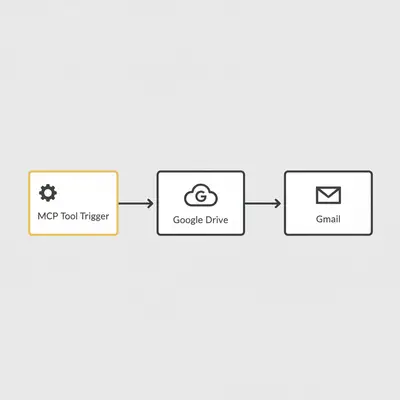
In your n8n workflow, connect your Tool Trigger to:
- Google Drive Node: Operation
Search. - Gmail Node: Operation
Get Messages. - Merge Node: Combine the results into a clean JSON text list.
Why this works: Normally, an AI agent would need to authenticate with Drive and Gmail separately. Here, n8n uses its stored credentials. The AI never touches an API key. It just receives clean text.
Pro Tip: Filter Heavily in n8n. Don't send 500 raw JSON objects back to the AI. Use a "Code" or "Edit Fields" node to strip out IDs and metadata. Send only the
Subject,Snippet, andLink. Keep the payload light to maintain the "anti-gravity" speed.
Step 3: Experiencing the Anti-Gravity (The User Experience)
Once your n8n server is connected to your Claude Desktop config (via the claude_desktop_config.json file), the magic happens.
You open Claude and type: "Find the contract sent by Apex Corp last week and draft a reply confirming we signed it."
Without MCP (The Heavy Way): You would switch tabs to Gmail. Search "Apex Corp". Filter by last week. Find the email. Download the attachment. Read it. Go back to Claude. Paste the context. Ask for a draft.
With n8n MCP (The Anti-Gravity Way):
- Claude sees the
google_workspace_searchtool. - It sends
{ "query": "Apex Corp contract" }to n8n. - n8n executes the search in milliseconds, retrieves the email content and file name, and returns it.
- Claude reads the context and drafts the reply instantly.
It feels like the data was already there. The friction of "searching and retrieving" is gone.
Real-World Use Case: The "Floating" CRM
Let's look at a concrete example of how this impacts a small business.
Scenario: A boutique marketing agency, "SkyHigh Creative," manages client assets across Google Drive and tracks projects in Google Sheets.
The Problem: Account managers spend 2 hours a day manually checking:
- Did the client upload the logo to Drive?
- Did they email the brief?
- Is the Google Sheet updated?
The Anti-Gravity Solution:
They set up an n8n workflow exposing a tool called check_client_status.
- Input: Client Name.
- Logic: n8n searches the specific Drive folder for new files + checks Gmail for recent threads + looks up the row in Sheets.
The Result: An account manager types into their AI agent: "What's the status on the RedBull project?"
The agent calls n8n. n8n aggregates the data from three silos. The agent replies: "The 'RedBull' folder has a new file 'logo_v2.png' uploaded 2 hours ago. No new emails since Tuesday. The project sheet is marked 'In Progress'. Should I email them to confirm receipt of the logo?"
Reality Check: Setup Time. While the usage feels weightless, the setup takes time. Configuring the MCP server and testing the JSON schema in n8n takes about 2–4 hours. But the time savings are permanent.
Cost Comparison: Gravity vs. Anti-Gravity
Does this defy the laws of economics too? Let's check the costs of managing this data retrieval manually versus via n8n MCP.
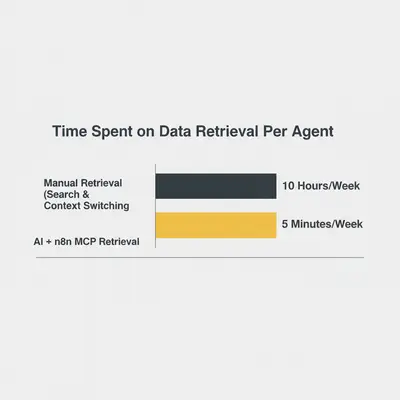
The difference isn't just efficiency; it's capability. When data access is instant, you start doing things you never did before—like checking every single active client status every morning, because it costs you zero effort.
Troubleshooting the Physics (Common Pitfalls)
Even in zero gravity, things can bump into each other.
- Timeout Limits: AI agents expect tools to respond quickly (usually within 30-60 seconds). If your n8n workflow takes 5 minutes to scrape a huge Google Drive folder, the AI will time out.
- Fix: Use n8n to trigger a background job and return a "Processing started" message, or optimize your search queries.
- Context Overload: If n8n returns 50 pages of raw email data, you'll hit the AI's token limit or confuse it.
- Fix: Use an LLM node inside n8n to summarize the data before sending it back to the main AI agent.
- Authentication Scope: Ensure your n8n Google credentials have the correct scopes (
drive.readonly,gmail.readonly) or the workflow will fail silently.
Conclusion: Let Your Data Float
The "Google Anti-Gravity" effect isn't just a fun metaphor. It's a shift in how we think about automation.
For the last decade, we have been building pipelines—rigid tubes that move data from Point A to Point B. Pipelines have friction. They leak. They break.
With n8n and MCP, we aren't building pipelines. We are building API surfaces for intelligence. We are letting the AI decide what data it needs and when. We are removing the gravity of manual retrieval and rigid logic.
When you take the weight out of your workflow, you don't just work faster. You fly.
What’s Next?
- Install Claude Desktop and enable the MCP feature.
- Spin up n8n and create your first "Tool" workflow.
- Connect Gmail and ask your AI: "What's the most important email I missed today?"
Experience the weightlessness for yourself.
Related Resources
- Automate Gmail, Sheets, and Docs with Google Workspace Flows
- Understanding AI Agents vs Workflows
- The Ultimate n8n Error Handling Guide
Official Sources
- Model Context Protocol (MCP) Documentation
- n8n AI & LangChain Documentation
- Google Workspace API Overview
By Kevin Michael Schindler, AI Automation Expert at Evalics