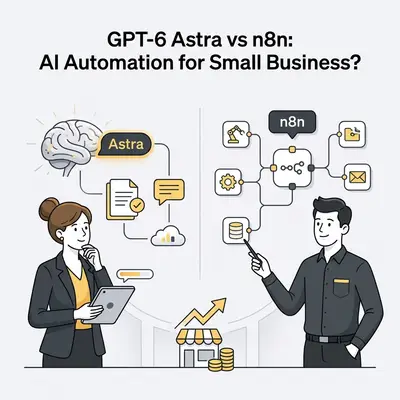
GPT-6 Astra is OpenAI's computer-use model, released in early September 2026. It operates software the way a person does: through the desktop, the browser, and the terminal. n8n is a workflow automation platform. It links applications through APIs and fixed, deterministic logic.
The right choice depends on the work. Some tasks need judgment inside a graphical interface. Others are structured, event-driven data flows between cloud services:
- GPT-6 Astra: Operates via autonomous computer use, controlling desktop apps, browsers, and local dev environments directly with end-to-end task execution.
- n8n: Executes pre-defined workflow pipelines triggered by Webhooks, APIs, and scheduled events with predictable execution logic.
How Does Computer-Use AI Compare to API-Driven Workflow Automation?
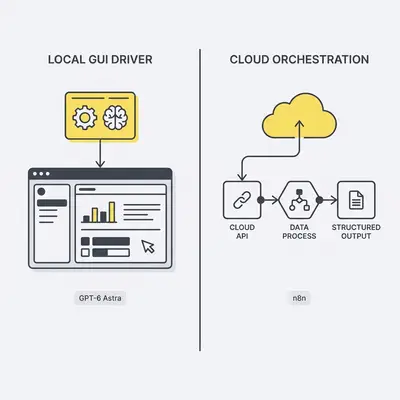
Computer-use AI works like a human operator. It reads the screen and uses the mouse and keyboard to complete unscripted tasks. Workflow automation instead calls API endpoints directly to move structured data between databases and cloud platforms.
| GPT-6 Astra (computer use) | n8n (API workflows) | |
|---|---|---|
| How it works | Reads the screen, clicks and types | Calls APIs with fixed logic |
| Best for | Unstructured tasks, apps without APIs | Repeatable, rule-based data flows |
| Reliability | Varies with each run and UI changes | Same input, same output |
| Speed | Seconds to minutes per task | Milliseconds to seconds per step |
| Cost driver | Tokens on every run | Hosting or plan, little per run |
| Setup | Prompt and guardrails | Workflow build and maintenance |
| Self-hosting | No, runs through OpenAI | Yes, open-source engine |
 |
For small business operations, this creates two distinct approaches to handling daily tasks:
- Autonomous GUI Control: GPT-6 Astra interacts with legacy desktop software, specialized CAD tools, and web portals lacking public APIs, completing complex multi-step workflows like updating custom CRMs or operating desktop utilities.
- Structured Pipeline Execution: n8n processes high-volume Webhook events in milliseconds, executing strict logic branches, data transformations, and system updates without visual overhead or risk of user interface shifts breaking the sequence.
When Should a Small Business Choose GPT-6 Astra?
Choose GPT-6 Astra for complex, non-standard tasks. These include real-time reasoning, document creation, software troubleshooting, and work in applications that have no API.
Key Insight: Autonomous computer-use AI models remove the requirement for developer-built API integrations by operating software directly through the visual user interface layer.
GPT-6 Astra excels in handling flexible, unstructured work across several key operational scenarios:
- Legacy & Desktop Software Automation: Managing software without open APIs, such as local inventory tools, specialized CAD utilities, or legacy desktop CRMs.
- Unstructured Document & Asset Creation: Generating polished slide decks, tailored executive summaries, and formatted spreadsheets directly matching internal company style guides.
- Interactive QA & Research: Running multi-step browser research, performing frontend website QA testing, and executing code-level debugging across terminal environments.
When Is n8n the Better Choice for Small Business Automation?
Choose n8n for reliable, high-volume background automation with predictable costs. It fits routine tasks with clear rules and structured data.
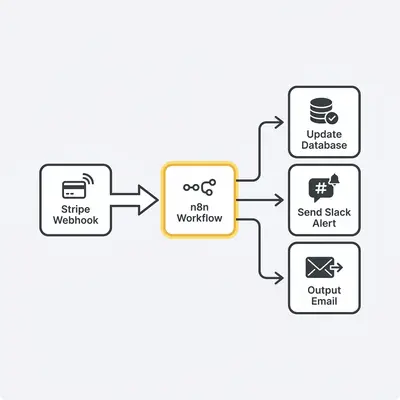
Key operational environments where n8n provides optimal performance include:
- Event-Driven Data Syncing: Real-time synchronization between CRMs, payment gateways like Stripe, and fulfillment platforms whenever new orders or leads are submitted.
- Strict High-Volume Pipelines: High-throughput transactional tasks where process execution must follow fixed deterministic rules without model variance or token consumption costs.
- Self-Hosted Infrastructure: Businesses requiring strict on-premise data governance and compliance, leveraging n8n's self-hostable open-source engine.
What Are the Cost and Performance Trade-offs?
The trade-off is flexibility against cost and speed. Astra reasons through each task but pays for it in tokens and time. n8n is fast and cheap per run but only does what you built it to do.
Pro Tip: Offload high-frequency background data transfers to n8n to avoid wasting token capacity on simple, repetitive API calls.
- GPT-6 Astra Performance & Pricing: OpenAI reports a score of 72.6% on an offline subset of the OSWorld 2.0 computer-use benchmark, ahead of its previous models. That figure is vendor-reported, not independently verified. Every run consumes tokens, so continuous desktop automation carries an ongoing cost that grows with volume.
- n8n Performance & Pricing: Features extremely low execution overhead per workflow run, making it cost-effective for millions of monthly API execution cycles, but requires upfront developer setup and ongoing workflow maintenance.
How Can Small Businesses Combine Astra and n8n into a Hybrid Architecture?
The strongest setup uses both. n8n is the event-driven backbone, and it calls GPT-6 Astra only for the complex, non-standard steps.
n8n Workflow (Trigger & Route) ──► GPT-6 Astra (Unstructured Task Execution) ──► n8n Workflow (DB Commit & Notification)
- Event Capture: n8n listens for incoming customer support emails or web form submissions via Webhook.
- Data Extraction & Routing: n8n passes unstructured email text or document attachments directly to Astra via API.
- Agentic Processing: GPT-6 Astra analyzes the input, executes necessary browser or computer-use research, and generates a structured output response.
- Final Action & Logging: n8n receives Astra’s output, writes the record to the company database, and sends notifications through Slack or email.
The following JSON payload illustrates how an n8n HTTP Request node could call an AI model and get structured JSON back. Treat it as a sketch: check OpenAI's API documentation for the current model ID and computer-use parameters.
{
  "model": "gpt-6-astra",
  "messages": [
    {
      "role": "system",
      "content": "You are an automated triage agent. Analyze the customer inquiry, perform necessary web lookup steps, and return a structured JSON response containing priority_level, recommended_action, and draft_reply."
    },
    {
      "role": "user",
      "content": "Customer message: {{ $json.body.message_text }}"
    }
  ],
  "response_format": { "type": "json_object" }
}
Quick Win: Use n8n to parse unstructured Webhook inputs before passing them to Astra, ensuring the model only processes relevant context to minimize token usage.
How Do You Decide Which Tool Is Right for Your Workflows?
To determine the best operational approach for your company's automation stack, evaluate your specific process requirements against this step-by-step decision framework:
- Audit your process interfaces: Map whether your software stack relies on cloud APIs (favoring n8n) or local desktop applications and legacy interfaces (favoring Astra).
- Evaluate data structure: Determine if incoming data is strictly formatted JSON or tabular data versus unstructured text, documents, and visual inputs.
- Assess variance and decision complexity: Identify whether every step follows rigid "if/then" logic or requires judgment calls, synthesis, and creative layout.
- Measure volume and speed requirements: Calculate task throughput; high-frequency background triggers favor n8n's instant API execution, while complex multi-step research favors Astra's computer-use efficiency.
- Map security and alignment boundaries: Establish necessary safeguards—leveraging self-hosted n8n workflows alongside strict scope constraints for sensitive administrative tasks.
To implement this decision model in your operations today:
- Identify three manual tasks in your operations that consume the most staff hours each week.
- Categorize each task interface as either API-accessible or GUI-only.
- Build your high-frequency API tasks directly inside an n8n workflow setup, and reserve AI agent execution exclusively for unstructured decision steps.
Sources
- GPT-6 Astra - OpenAI
- GPT-6 Astra Is a Star - The Batch, DeepLearning.AI