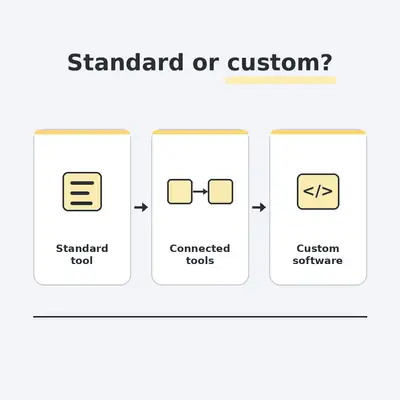
Sooner or later almost every company asks: is the standard product enough, or should we have something of our own built? The answer depends less on technology than on your process. This guide helps you make the decision in the right order, without needing to develop software yourself.
It complements the post Build vs. Buy: When to Stop Paying for SaaS and Build It Yourself. That one is about the math: subscription costs, pricing tiers, and building with automation platforms. This one is about the decision before that: how well does a product cover your process, what is left over, and who owns the result?
Ask the right question
"Buy or build?" is rarely the best question. A better one is: how well does a standard product cover my process, and what do I keep paying for the gap?
Between "fits completely" and "does not fit at all" lies a large grey zone. That is exactly where the expensive workarounds come from: a tool that does everything essential but one thing, and a person who bridges that one thing by hand every day.
When an off-the-shelf tool is enough
Buy if a standard product covers your process well. Typical signs:
- The process is ordinary. It runs similarly in many companies, and nobody expects you to solve it differently.
- The product fits without contortions. Your team works in the tool, not around it.
- The process is not a differentiator. It is not the reason customers choose you.
- You do not need a special feature that only one vendor offers on a pricier plan.
A standard product has a practical advantage: there is a point of contact, updates arrive on their own, and you do not have to operate anything. If that is enough, you can skip the project.
When custom software pays off
Custom software pays off when the process is special or you keep paying for workarounds. Four typical starting points:
- The spreadsheet is the system. Important workflows run on Excel files that only a few people understand. If the person who maintains them is out, the process stops.
- Standard software almost fits. You pay for a tool and still work with copy and paste around it every day.
- Many tools, no connection. Data sits in several systems, and someone moves it by hand.
- A product idea, no tech team. You want to offer software to your own customers but have no developers in-house.
Important: custom software is not an end in itself. It does not pay off because it is "custom", but because it closes a gap you would otherwise fill yourself every day.
The middle path: connect your standard tools
Between buying and building there is a third option that is often overlooked: keep your standard tools and automate the handoffs between them. Copying data, sorting emails, chasing approvals: these are steps that can be automated between existing programs such as CRM, email, or accounting software. You can read more under process automation.
This path has two advantages. It is usually a smaller step than custom software. And it shows which gap really remains. If a core problem is still there after your tools are connected, you know much more precisely what custom software has to do.
Ownership and lock-in: the questions before you start
For standard products and custom software alike: settle ownership and dependency before anything is built or bought. Ask every vendor these questions:
- Who owns the code, and who owns the data?
- Does the solution run in your own accounts or in the vendor's systems?
- How do you get your data out if you want to switch vendors?
- Is the solution documented so that your team can operate it without the service provider?
At Evalics we build in your own accounts, the code belongs to you, and we document the software so that your team can operate it. You can read more about our offer under custom software for mid-sized companies.
Ongoing costs: the starting price is not everything
Do not compare only the price at the start. Every solution comes with running items: licenses for standard products, hosting and operations for custom builds, for example. Ask for these items before you decide, not afterwards. Serious providers define ongoing costs before building starts, so you know what to expect.
How to decide: five steps
- Describe the process in plain sentences. Who does what, with which data, in what order?
- Test a standard product with your real data. A demo with sample data says little. With your own cases you quickly see where it stalls.
- Name the gap. What is left if you use the product? How often does it occur, and who bridges it?
- Check the middle path. Can the gap be closed with connected tools and automation?
- Build only the rest. If a core problem still remains, define together what the software must do and what it deliberately does not do. Have a prototype built early and test it with real data before building further.
Whether you are in this decision yet, or should first work out where AI and automation make sense in your company, is covered in the guide AI in Mid-Sized Companies: Where to Start.
Next step
Write down one process where your team takes detours every day, and the tool currently used for it. With those two answers, the question "standard or custom?" can be answered concretely.
If you want to work it out together: in the free intro call we look at your process and tell you honestly whether a standard product is enough, whether connected tools will do, or whether custom software makes sense. That holds even if the answer is that you do not need us. If you are in the Göppingen region: software development in Göppingen.