
You open your inbox to 142 unread messages. You spend the first hour of your day deleting newsletters, forwarding invoices to your accountant, and flagging client questions. Every time you clear ten emails, twelve more appear.
Your inbox has become a messy, stressful to-do list.
For most small business owners, email is the single biggest interruption in the working day, and it arrives all day. Traditional email filters fail because they rely on rigid rules. If a client sends an urgent request from a new email address, your "Rule-Based" filter misses it entirely.
You need a lean, intelligent system. You need an automated workflow that reads, categorizes, and routes your email exactly like a human assistant would—but instantly, and for a fraction of the cost.
Here is exactly how to stop babysitting your inbox and achieve true email zero using AI automation.
The Hidden Cost of the "Inbox To-Do List"
Many business owners view email processing as a necessary evil. They accept the lost hours as the cost of doing business. But when you break down the actual numbers, manual email management is one of the most expensive leaks in your operations.
If you spend just two hours a day triaging emails, that equals 10 hours a week. Over a year, you lose 500 hours to a task that requires zero high-level strategic thinking.
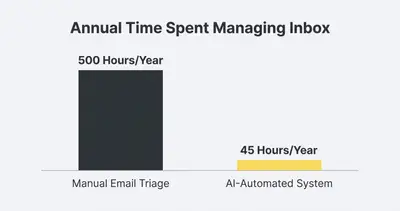
Beyond the time cost, manual email management creates operational bottlenecks. A hot lead sits in your inbox for four hours while you are in meetings. A vendor invoice gets buried under automated software updates. A crucial client issue gets accidentally swiped into the archive folder.
Reality Check: Your inbox is a communication channel, not a project management tool. If emails dictate your daily schedule, you are reacting to other people's priorities instead of executing your own.
Why Basic Filters Fail
We all try to organize our inboxes with built-in rules. We tell Gmail to "Move all emails with 'Unsubscribe' to the Promotions folder." We tell Outlook to "Flag emails from top clients."
This works for simple scenarios. It fails completely when context is required.
An email from a regular client might be a friendly check-in, or it might be an urgent request to expand their contract. Basic filters cannot tell the difference. They only look at the sender or specific keywords.
AI changes this entirely. Modern language models (like Claude 3.5 Sonnet or GPT-4o) actually "read" the context of the message. They understand intent. This allows you to build a lean system that automatically makes complex routing decisions on your behalf.
The Core Elements of a Lean Email System
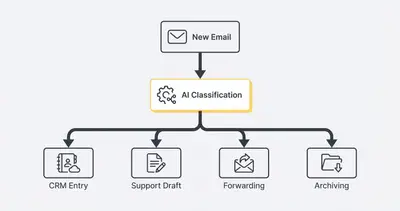
A lean email system relies on three core stages: Trigger, Triage, and Route. You can build this entire flow in automation platforms like n8n or Make.
Here is how the architecture looks.
1. The Trigger (Catching New Mail)
The automation starts the moment an email hits your inbox. Instead of checking your email manually, your workflow platform listens for new messages via a direct integration with Gmail or Outlook.
2. The Triage (AI Classification)
The workflow sends the email content to an AI model. You provide the AI with a specific set of instructions, essentially teaching it how to categorize the mail based on your unique business needs.
The AI analyzes the sender, subject line, and body text. It then assigns a strict category:
- Lead: Someone asking about your services.
- Support: An existing client needing help.
- Admin/Billing: Invoices, receipts, or HR updates.
- Noise: Newsletters, cold outreach, or spam.
3. The Route (Taking Action)
Once the email is categorized, the workflow takes immediate action without you lifting a finger.
- Leads are instantly forwarded to your sales Slack channel and added to your CRM.
- Support tickets are moved to a dedicated "Client Support" folder, and an automated draft reply is generated.
- Admin emails are forwarded directly to your bookkeeper.
- Noise is instantly archived or deleted.
Step-by-Step Implementation Guide
Setting up this system does not require you to be a software engineer. You just need to connect the right tools logically.
Step 1: Connect Your Inbox to Your Workflow Tool
Start in your chosen automation platform (we highly recommend n8n for this). Add the standard email trigger node.
Configure it to watch your main inbox folder. Tell the platform to grab the email's Subject, Sender Email, and Text Body.
Pro Tip: Only trigger the workflow for emails where you are directly in the "To" line. Skip emails where you are just CC'd or BCC'd to save processing power and API costs.
Step 2: Write the Triage Prompt
The success of this system depends entirely on your system prompt. You must give the AI strict rules so it doesn't invent new categories.
Use a prompt structure like this in your AI node:
"You are an expert executive assistant. Read the provided email and categorize it into exactly one of the following buckets: LEAD, CLIENT_ISSUE, BILLING, or NOISE.
Rules:
- If they ask for pricing or a meeting, output LEAD.
- If it contains a receipt or invoice, output BILLING.
- If it is marketing, a newsletter, or a cold sales pitch, output NOISE.
- If it is an existing client needing help, output CLIENT_ISSUE.
Only output the exact word of the category. Do not add any conversational text."
Step 3: Set Up Your Routing Paths
Add a "Switch" node or "Router" module directly after the AI categorizes the email. Create a different path for each of your four categories.
If the path is NOISE, add a Gmail/Outlook node that simply archives the email and marks it as read. Just like that, 60% of your daily inbox clutter disappears permanently.
If the path is LEAD, use the platform to extract the contact's name and send a notification to your phone. You can even have the AI draft a polite response and save it in your drafts folder. You just review it and click send.
The Impact on Your Bottom Line
When you implement this system, the financial return on investment is immediate. Many business owners try to solve inbox chaos by hiring a Virtual Assistant. While VAs are incredibly valuable for complex tasks, paying a human to act as a human spam filter is a massive waste of capital.
Let's look at the numbers. Sorting 5,000 emails a month requires roughly 40 hours of human labor. At $20 an hour, that costs $800 a month.
Using an AI model like GPT-4o-mini via API costs fractions of a cent per email.
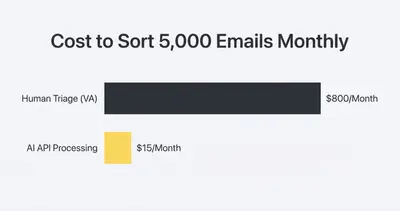
The cost savings are undeniable, but the speed is the real advantage. Your AI system categorizes and routes a lead in roughly three seconds. Your response time drops from hours to minutes, dramatically increasing your conversion rate.
Expanding Your Lean System
Once you trust the AI to categorize your inbox accurately, you can start building more advanced workflows on top of it.
Automate the Draft Replies
Don't stop at categorizing client questions. Feed your company's FAQ document and past responses into the workflow. When the AI detects a "Support" email, have it draft a highly accurate response based on your actual company data. It saves the response as a draft. When you log in, you simply approve the drafts. This alone cuts your typing time by 90%.
Extract Action Items
If an email contains a list of requests from a client, add a step that asks the AI to extract the "Action Items." The workflow can automatically create tasks in Asana, Trello, or Monday.com, assigning due dates based on the email context.
The VIP Client Bypass
You can combine traditional rules with AI. Set up a quick filter before the AI step: "If Sender is [Your Biggest Client], instantly text my phone and bypass standard sorting." This ensures your most critical relationships always get immediate human attention.
Quick Win: Start small. Build a workflow that only identifies and archives "Noise" emails first. Let it run for a week. Once you see how accurately the AI identifies cold outreach and newsletters, you will feel confident adding the routing paths for Leads and Clients.
Changing Your Relationship with Email
Implementing a lean email system fundamentally changes how you work. You stop checking your inbox nervously between meetings. You stop using unread messages as a measure of your productivity.
Instead, you log into your email twice a day. You see zero spam. You see a tidy folder of leads waiting for your response. You see automatically drafted replies for routine questions. You deal with the high-value communication, and you close the tab.
Automation gives you the ultimate leverage. It handles the manual sorting so you can focus strictly on the human connection.
Related Resources
- The 5 Step System To Automate Your Inbox And Reclaim 10 Hours A Week
- Ai Chatbots Vs Email Automation When To Use Each With Examples
- Stop Paying For Zapier 5 N8n Workflows Every Agency Needs
- 7 Everyday Business Processes You Should Hand Over To Ai Tomorrow
Official Sources
- McKinsey: The social economy unlocking value and productivity through social technologies
- n8n Documentation: Email Node Configuration
- Harvard Business Review: How to Spend Way Less Time on Email Every Day
Stop letting your inbox control your daily schedule. Ready to implement a lean, AI-powered system that routes your emails and saves you hours every week? Book a demo with Evalics today, and let's automate your daily operations.