You didn't start a business to spend three hours a day formatting spreadsheets or copying email addresses into a CRM. Yet, for most small business owners, "admin bloat" silently eats away at profitability.
There is a misconception that AI automation requires an enterprise budget or a dedicated engineering team. The reality is that the tools available right now—today—are accessible, affordable, and powerful enough to handle your most repetitive tasks.
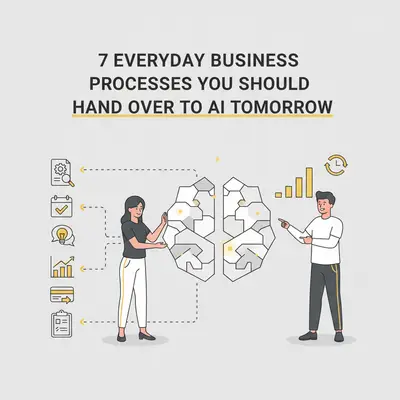
Automation isn't about replacing your team. It's about removing the robotic work from humans so they can focus on what actually drives revenue. If you are doing any of the following seven tasks manually, you are wasting money. Here are the processes you should hand over to AI tomorrow.
1. Inbox Triage and Draft Responses
Your inbox is likely a mix of high-priority client leads, newsletters, spam, and administrative updates. Manually sorting through this noise is a massive energy drain. According to the McKinsey Global Institute, professionals spend 28% of their workweek managing email. That is over 11 hours a week lost.
AI can act as your executive assistant. (AI as your executive assistant) By connecting a tool like n8n or Make to your Gmail or Outlook, you can send every incoming email through an AI model (like GPT-4o or Claude 3.5 Sonnet).
How it works:
- Categorization: The AI analyzes the email body and labels it (e.g., "Urgent Lead," "Invoice," "Spam," "Newsletter").
- Drafting: If it’s a client inquiry, the AI drafts a response based on your company’s tone and historical data.
- Action: It saves the draft in your "Drafts" folder. You simply review and hit send.
Quick Win: Don't automate the sending immediately. Automate the drafting. This keeps you in control while saving 90% of the typing time.
2. Meeting Notes and Task Extraction
You finish a great Zoom call, close your laptop, and immediately forget half of what was promised. Or worse, you spend the next 20 minutes transcribing notes and manually creating tasks in your project management tool.
AI handles this flawlessly. Tools like Fireflies.ai or custom workflows using OpenAI's Whisper model can record, transcribe, and analyze your meetings.
The Automation Workflow:
- Record & Transcribe: Audio is converted to text.
- Summarize: AI extracts key decisions and a summary.
- Task Creation: The AI identifies action items (e.g., "Kevin to send proposal by Friday") and automatically creates a task in ClickUp, Asana, or Monday.com assigned to the right person with a due date.
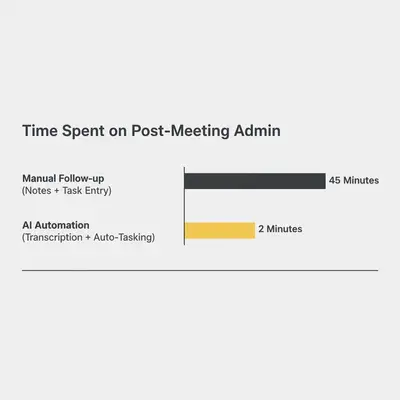
This ensures no lead falls through the cracks and no promise is forgotten.
3. Lead Qualification and Scoring
Speed is everything in sales. If a lead fills out a form on your website at 8 PM, waiting until 9 AM the next day to review it might cost you the deal. However, you don't want to waste time calling unqualified leads.
You can set up an automation that instantly processes every new form submission.
The Workflow:
- Enrichment: AI searches for the company URL or LinkedIn profile to gather data (size, industry, location).
- Scoring: The AI compares the lead against your "Ideal Customer Profile" (ICP).
- Routing:
- High Score: Instantly notifies your sales team on Slack and drafts a personalized email introduction.
- Low Score: Adds them to a nurturing email sequence.
Key Insight: This is distinct from basic rule-based automation. AI can interpret vague answers like "I'm looking for a solution for my small team" and understand that implies a specific company size, whereas a rule-based system might miss that context.
For a deeper dive on how to set this up, read our guide on what is AI lead qualification.
4. Turning One Piece of Content into Five
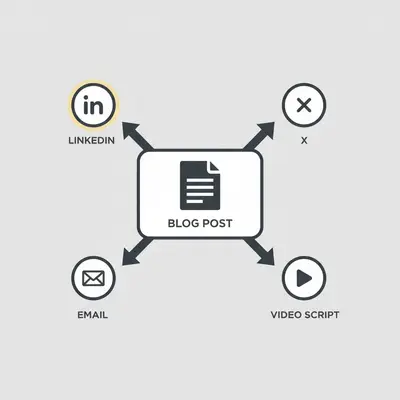
Creating content is hard. Repurposing it should be easy. If you write a blog post (like this one), you shouldn't manually rewrite it for LinkedIn, X (Twitter), and your newsletter.
The Automation: Feed your final blog draft into an AI workflow.
- Analyze: The AI reads the tone and key points.
- Generate: It outputs:
- A LinkedIn post with a professional hook.
- A thread for X with punchy, short sentences.
- An email newsletter summary with a "Read More" link.
- A script for a 60-second Instagram Reel or TikTok.
This allows you to maintain an active social presence without hiring a full-time social media manager.
5. Invoice Processing and Expense Tracking
Manual data entry is prone to error and incredibly boring. Processing invoices is one of the best candidates for automation because the data is structured, even if the layout varies.
The Workflow:
- Capture: You forward an invoice PDF to a dedicated email address or upload it to a Drive folder.
- OCR & Extraction: AI (using tools like Document AI or GPT-4o with Vision) reads the PDF. It extracts the Vendor Name, Date, Line Items, Tax, and Total Amount.
- Entry: The automation logs this data directly into your accounting software (QuickBooks, Xero) or a master Google Sheet.
This reduces human error and ensures your financial reporting is real-time, rather than "whenever I get around to it."
Reality Check: While AI is 99% accurate, always have a "review step" for high-dollar invoices before payment is authorized.
6. Customer Support FAQ Handling
Customers expect instant answers. If you are a small team, you cannot staff a support desk 24/7. However, leaving customers waiting 24 hours for a simple answer like "How do I reset my password?" creates friction.
You can build an intelligent chatbot (or email auto-responder) using RAG (Retrieval-Augmented Generation).
How RAG works: Instead of just guessing, the AI looks up your actual help documents, PDFs, and past resolved tickets to find the answer. It then formulates a polite response citing the correct information.
- Simple Query: AI answers instantly.
- Complex Issue: AI recognizes it cannot solve the problem and escalates the ticket to a human, summarizing the issue for them.
This creates a hybrid model where AI handles volume, and humans handle value. Learn more about the differences in our comparison of AI chatbots vs. email automation.

The cost savings here are dramatic. As shown above, utilizing AI for the initial triage and resolution of simple tickets slashes the cost per ticket by over 85%.
7. Competitor and Market Monitoring
Staying ahead requires knowing what your competitors are doing. Checking their pricing pages, blogs, and press releases manually is a task that usually falls to the bottom of the to-do list.
AI can watch the web for you.
The Workflow:
- Monitor: An automation regularly scrapes specific competitor URLs.
- Compare: It compares the current version of the page to the previous version.
- Alert: If a competitor changes their pricing or launches a new feature, you get a Slack notification summarizing the change.
This gives you real-time market intelligence without the manual browsing. For a detailed breakdown of how this works, check out our post on how AI tracks competitors in real-time.
How to Start Without Getting Overwhelmed
Reading this list might make you want to automate everything at once. Don't.
Automation projects fail when they try to do too much too soon. The best approach is the "Ladder of Complexity":
- Pick ONE process from this list. (I recommend Meeting Notes or Email Drafting—they are low risk and high visibility).
- Map it out. Write down exactly what you do manually.
- Build the MVP. Create a simple version using a tool like Make or n8n.
- Test. Run it for a week. Fix the bugs.
- Scale. Once it works, move to the next process.
If you aren't sure if a task is worth automating, use the 5-minute automation test to validate it first.
Conclusion
The difference between a stressed business owner and a scalable business owner is often the systems they build. By handing over these seven everyday processes to AI, you aren't just saving time—you are buying back your mental bandwidth.
You can spend your day copy-pasting data, or you can spend it growing your company. The choice is yours, and the technology is ready when you are.
Key Takeaways
- Start Small: Don't try to automate your entire business overnight. Start with high-volume, low-creativity tasks like meeting notes or invoice processing.
- Human in the Loop: For sensitive tasks like email or lead replies, use AI to draft and humans to approve.
- Cost vs. Value: The cost of these tools is negligible compared to the 10+ hours a week you will save.
Ready to reclaim your time? Pick one process from this list and hand it over to AI this week.
Related Resources
- The 5-Minute Automation Test: Find Your First Win
- Make vs n8n: 2025 AI Automation Comparison
- What is AI Lead Qualification?
- AI Chatbots vs Email Automation: When to Use Each
Official Sources
- McKinsey Report on Social Technologies & Worker Productivity
- Zapier State of Business Automation Report
- HubSpot Sales Strategy & Data
By Kevin Michael Schindler, AI Automation Expert at Evalics