You buy a shiny new automation tool. You connect your CRM to your email platform. You turn the workflow on. Suddenly, a new lead gets five duplicate emails, a wrong invoice, and a calendar invite for the wrong year.
Automating a broken process does not fix the process. It just helps you do stupid things faster.
Software like Make, Zapier, or n8n cannot read your mind. These tools require exact rules, specific triggers, and predictable data. If your team handles a task differently every single time, you cannot automate it. This is exactly why your first AI automation will fail if you skip the planning phase.
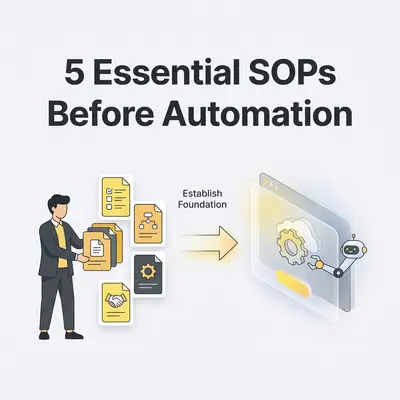
Before you build a single workflow, you need Standard Operating Procedures (SOPs). An SOP is simply a step-by-step checklist of how a specific task gets done. It translates human habits into strict rules that a computer can actually follow.
Here are the five critical SOPs every service business must document before touching automation software.
1. The Lead Capture and Triage SOP
When a potential client fills out a form on your website, what happens next? In many service businesses, the answer is "someone checks the email and replies when they have time."
You cannot automate "when they have time."
A documented lead capture SOP defines exactly how a prospect enters your system. It outlines where the data goes, who gets notified, and what the immediate next step is.
What your lead SOP must include:
- The Trigger: Where does the lead come from? (Website form, Facebook ad, direct email).
- The Data: What exact information must you collect? (Name, budget, company size).
- The Routing: Who receives the notification?
- The Response: What is the exact email template or text message sent to the lead?
- The Timeline: How quickly must the business respond?
Pro Tip: Do not ask for a phone number on your lead form if your SOP states you only reply via email. Only collect data that your SOP actively uses.
2. The Client Onboarding SOP
The gap between a signed contract and the project kickoff is the most vulnerable point in a service business. Clients experience buyer's remorse if you go quiet after taking their money.
Before automating client onboarding, you must document the manual steps required to bring a new client into your ecosystem. You need a rigid checklist that covers folder creation, welcome emails, and data collection.
What your onboarding SOP must include:
- The exact moment onboarding begins (e.g., Stripe payment succeeds).
- The list of internal folders, Slack channels, or project boards you must create.
- The specific documents the client needs to read or sign.
- The exact welcome email copy and kickoff call scheduling link.
Building an automation without this SOP results in half-finished setups. You will create the Slack channel automatically, but forget to invite the client. Write the steps down first.
3. The Service Fulfillment SOP
Fulfillment is the actual work your agency or consulting business does. It is usually the hardest part to automate because it requires human creativity and expertise.
However, you do not need to automate the entire job. You only need to automate the administrative steps around the job. Apply the 80/20 rule of business automation here. Document the repetitive administrative tasks that support your core service.
What your fulfillment SOP must include:
- How team members track their time or log completed phases.
- Where final deliverables are stored (exact naming conventions matter).
- How the client is notified of progress.
- The quality assurance checklist before a project is marked "complete."
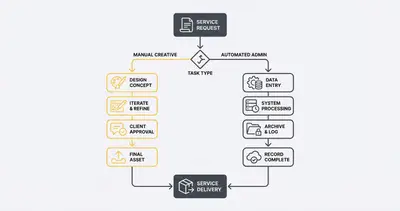
If your team names files differently every time (e.g., Final_Logo.png vs Logo_V2_Done.png), an automation tool cannot find and send those files to the client. Strict naming conventions in your SOP make automation possible.
4. The Invoicing and Collections SOP
Getting paid should never rely on human memory. Yet, many business owners manually generate invoices at the end of the month, attach them to emails, and manually check their bank accounts to see who paid.
A documented billing SOP is the foundation of reliable business process automation. It ensures you collect revenue consistently without awkward "just checking in" emails.
What your billing SOP must include:
- The exact trigger for an invoice (e.g., contract signed, milestone reached).
- The payment terms (Net 15, Net 30, due on receipt).
- The precise schedule for follow-up emails if an invoice is overdue (Day 3, Day 7, Day 14).
- What happens to the project work if an invoice hits 15 days past due.
Reality Check: If you are afraid to enforce late payment rules, automation will not fix your collections problem. Automation software does not feel bad about sending a past-due notice. You must define the rules first.
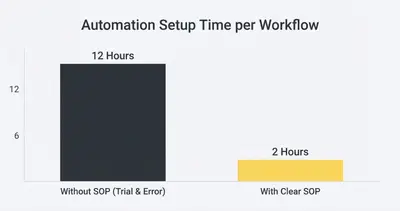
Without a documented SOP, building an automation workflow takes an average of 12 hours of trial, error, and bug fixing. You constantly pause to figure out what you actually want the software to do. With a clear SOP already written, building that exact same workflow takes just 2 hours.
5. The Customer Support and Resolution SOP
When a client has a problem, chaos usually ensues. Emails get forwarded, Slack messages get lost, and the client waits days for a simple answer.
You cannot automate customer support until you standardize how you handle complaints, change requests, and general questions.
What your support SOP must include:
- The single channel clients must use for support (e.g., a specific email address or portal).
- How a team member categorizes the issue (Bug, Feature Request, Billing Question).
- The SLA (Service Level Agreement) for response times.
- The escalation path if the first responder cannot solve the problem.
Once this SOP exists, automating it is easy. You can build a system that catches support emails, categorizes them using AI, creates a ticket in your project management tool, and alerts the right team member via Slack. But the software needs your categories and routing rules first.
How to Actually Write These SOPs Today
You do not need fancy software to write an SOP. You do not need a massive corporate handbook.
- Open a Google Doc. Give it a clear title (e.g., "SOP: Client Onboarding").
- Record yourself. The next time you onboard a client, turn on Loom or Zoom. Record your screen while you do the work. Talk out loud. Explain why you are clicking specific buttons.
- Transcribe and organize. Run that video transcript through an AI tool like ChatGPT or Claude. Ask it to format your spoken words into a numbered checklist.
- Test the document. Hand the checklist to someone else on your team. If they can complete the task without asking you questions, the SOP is ready.
Quick Win: Do not try to write all five SOPs this week. Pick the process that causes you the most daily stress. Document that one process today. Test it tomorrow.
Moving from SOPs to Automation
Automation software amplifies your current business operations. If your operations are tight, documented, and predictable, automation will scale your business effortlessly. If your operations are messy and unpredictable, automation will scale your mistakes.
Start with the Lead Capture SOP. Document exactly how a stranger becomes a prospect in your system. Once that document is bulletproof, you are finally ready to open an automation platform and build your first real workflow.
Ready to turn your documented SOPs into reliable software workflows? Book a process audit with our team to find out exactly which of your checklists should be handed over to AI.
Related Resources
- Why Your First AI Automation Will Fail and How to Prevent It
- Complete Guide to Business Process Automation
- Automating Client Onboarding: Paid Invoice to Welcome Packet
- 80/20 Rule of Business Automation: What to Automate First
Official Sources
- HubSpot: How to Write a Standard Operating Procedure
- Forbes: Why SOPs Are Critical For Scaling A Service Business
- Gartner: The Foundation of Business Process Automation
By Kevin Michael Schindler, AI Automation Expert at Evalics