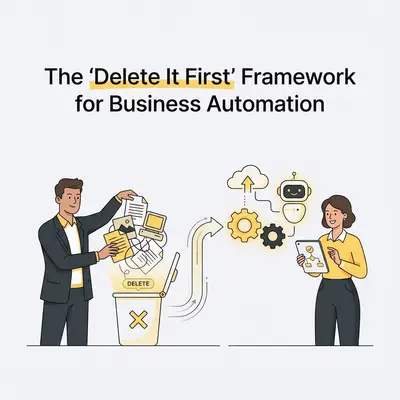
Most businesses treat automation like magic dust. They sprinkle it on a terrible process and expect instant efficiency. Instead, they get a disaster that moves at the speed of light.
You spend hours mapping out exactly how your team handles client onboarding. You connect your CRM, your email platform, your project management tool, and Slack. You hit "activate." Suddenly, your automation is firing off five redundant notifications, creating duplicate folders, and pinging your managers for approvals they don't need.
Bill Gates famously stated that automation applied to an inefficient operation will magnify the inefficiency.
Before you write a single prompt or connect a single webhook, you need a different approach. You need the "Delete It First" framework.
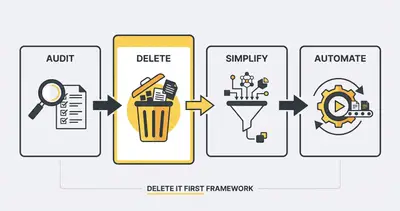
What is the "Delete It First" Framework?
The framework is simple: never automate a step without first asking if that step should exist at all.
When small businesses map their processes, they usually uncover years of operational debt. You find workarounds created for software you no longer use. You find extra approval stages added because one employee made a mistake three years ago. You find status update emails that nobody opens.
If you automate this garbage, you pay for it twice. You pay the API costs to run it, and you pay the maintenance costs when the complex workflow inevitably breaks.
Key Insight: The goal of business automation isn't to mimic a human doing a 15-step process. The goal is to achieve the outcome in as few steps as possible.
Step 1: Map the Harsh Reality
You cannot delete what you cannot see. First, you must map the process exactly as it happens today. Not how the employee handbook says it happens. Not how you wish it happened.
Write down every single click, copy-paste, and email.
If your sales rep copies a lead from an email, pastes it into a spreadsheet, reformats the phone number, and then imports it into the CRM—write all four steps down.
Do not try to fix the process during this phase. Just map the reality. If you want to know if a process is a good candidate for this exercise, run it through the 5-minute automation test.
Step 2: The Ruthless Deletion Phase
This is where the magic happens. Look at your mapped process and attack it.
Most standard operating procedures carry steps that provide zero value to the customer or the bottom line. They survive because nobody has questioned them, not because anybody needs them.
Look for these prime targets for deletion:
- The "Just in Case" Data: Are you asking for a client's fax number on a form? Are you saving a PDF backup of an invoice that already lives in Stripe? Delete it.
- The Rubber Stamp Approvals: If a manager approves 99.9% of routine vacation requests without looking at them, the approval step is useless. Delete it.
- The "FYI" Notifications: Sending an automated Slack message every time a new lead enters the system sounds cool. In reality, it distracts your team and trains them to ignore notifications. Delete it.
- The Re-formatting Steps: Stop manually fixing capitalization or standardizing dates. Modern software handles this natively.
Pro Tip: If a step exists solely to feed information to another internal system that nobody checks, you can safely eliminate it.
The Maintenance Impact of Deletion
Deleting steps isn't just about speed. It is about reducing your technical debt and workflow maintenance.
Let's say maintaining a complex, 15-step workflow with nested conditions takes 3 hours per week when APIs change or errors occur. If you delete the redundant steps and reduce it to a clean 5-step process, your maintenance time plummets.
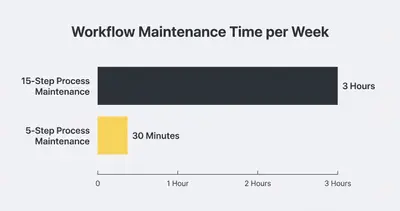
By cutting the process complexity by 66%, you reduce your maintenance burden by 83%. Fewer nodes mean fewer points of failure.
Step 3: Consolidate and Simplify
Once you have deleted the trash, look at what remains. Can multiple steps be combined into one?
If you currently send a welcome email, a pricing PDF, and a link to a scheduling calendar in three separate emails over two days, consolidate them. Send one clear, concise onboarding email that outlines the exact next steps.
Simplification sets the stage for a reliable automation. It ensures your logic flows cleanly from trigger to action. This is the core of the 80/20 rule in business automation—focus on the 20% of steps that drive 80% of the value.
Step 4: Automate the Remnant
Now, and only now, do you open n8n, Make.com, or your chosen AI platform.
Because you deleted the redundant steps, your automation will be lean. It will require fewer API calls. It will be easier to document, easier to test, and significantly easier to debug when something goes wrong.
You are no longer paving a cow path. You have built a highway.
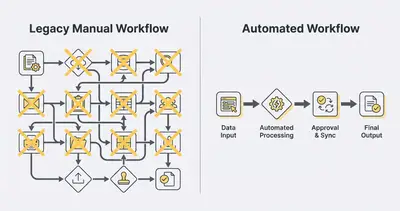
Real-World Example: Client Onboarding
Let's look at how the "Delete It First" framework transforms a real business process. We will look at a typical marketing agency's client onboarding.
The Original Process (12 Steps)
- Client pays invoice in Stripe.
- Sales rep gets email notification.
- Sales rep copies client details.
- Sales rep pastes details into Salesforce.
- Sales rep creates a Google Drive folder.
- Sales rep copies a "Welcome Document" template.
- Sales rep manually enters client name into the document.
- Sales rep downloads document as PDF.
- Sales rep drafts welcome email.
- Sales rep attaches PDF.
- Sales rep sends email.
- Sales rep posts "New Client!" in the Slack general channel.
Applying the Deletion Framework
- Step 2 (Email notification): Deleted. We don't need manual alerts if the next steps happen automatically.
- Steps 6, 7, 8, 10 (PDF generation): Deleted. PDFs are clunky. We moved the welcome information to a standard, hidden web page on the agency's site.
- Step 12 (Slack notification): Deleted. It distracts the engineering team. Account managers can just check the CRM.
The New Automated Process (4 Steps)
- Trigger: Stripe payment succeeds.
- Action 1: n8n creates a client record in Salesforce.
- Action 2: n8n generates a Google Drive folder.
- Action 3: n8n sends a standardized welcome email containing the link to the welcome portal and the Drive folder.
By deleting the unnecessary steps, we didn't just automate client onboarding. We fundamentally redesigned it to be faster and completely frictionless.
Ready to audit your workflows? Stop paying for inefficiencies. Book a consultation with Evalics today, and we'll help you identify exactly what to delete and what to automate.
The Cost of Automating Trash
If you skip the deletion phase, the financial consequences catch up with you quickly. This is one of the most common hidden AI automation costs.
Every time an automation tool executes a step, it consumes resources. In n8n or Make, it uses task executions. If you use AI agents to parse data, it consumes tokens.
If you feed an AI agent a massive, messy text file because you didn't want to clean the data first, you pay for thousands of wasted input tokens. If your workflow has seven redundant formatting steps, you hit your platform's usage limits faster.
Worse than the direct API costs is the cost of downtime. Complex, bloated automations break frequently. When a 25-step workflow fails on step 18, finding the error takes hours. When a clean, 4-step workflow fails, you can spot the issue in seconds.
Your Next Steps
Automation is a multiplier. Make sure you are multiplying the right things.
Start small. Pick one daily process that annoys you. Write down the steps. Force yourself to cross out at least 30% of them. Run the newly simplified process manually for a week.
If the outcome remains the same, you have successfully optimized your workflow. Now, you are ready to automate it.
By Kevin Michael Schindler, AI Automation Expert at Evalics
Related Resources
- The 5 Minute Test To See If Your Business Process Can Be Automated
- 80 20 Rule Business Automation What To Automate First
- Hidden AI Automation Costs No One Warns You About
- Automating Client Onboarding Paid Invoice To Welcome Packet
Official Sources
- Harvard Business Review: Before You Automate, Simplify
- McKinsey: The automation imperative
- Gartner: Avoid These Common Mistakes in Business Process Automation