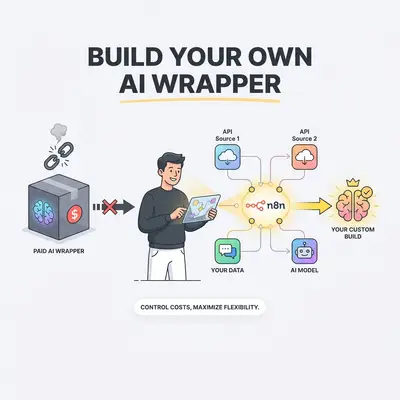
You sign up for a shiny new AI tool to help your team write marketing emails. It costs $49 a month. It works great. But behind the scenes, that tool is just taking your prompt, sending it to OpenAI, and slapping a nice interface on the response.
You are paying a massive markup for a middleman.
The software industry is currently flooded with "AI wrappers"—applications built entirely on top of existing AI models like ChatGPT, Claude, or Gemini. While these tools offer convenience, they trap businesses in expensive monthly subscriptions for basic functionality.
You don't need to pay for these wrappers. Using an automation platform like n8n and direct API access, you can build the exact same functionality yourself. You gain total control, keep your data secure, and slash your software bill.
Here is how to stop renting AI and start owning your automations.
The True Cost of AI Wrappers
AI wrappers charge you for convenience. They hide the technical complexity of API calls behind a polished dashboard. But that convenience comes at a steep price.
Let's look at the math. A popular AI writing assistant might charge $39 per user per month. For a team of five, that is $2,340 a year.
If you use that tool to write 100 blog posts a month, you use roughly 200,000 tokens. If you sent those same 200,000 tokens directly to the OpenAI API, it would cost you less than $1.00.
Reality Check: You aren't paying for advanced artificial intelligence. You are paying a premium for someone else's pre-written prompts and a pretty interface.
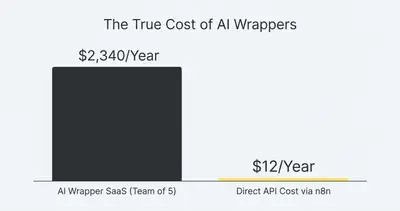
When you calculate the true cost of AI automation, bypassing wrappers is the fastest way to protect your profit margins.
Why Build Your Own AI Workflows?
Cost reduction is the most obvious benefit, but it isn't the only one. Building your own AI workflows gives your business a strategic advantage.
1. Ultimate Customization
SaaS wrappers force you to work within their constraints. If you want the AI to format a report a specific way, you have to hope the tool allows it. When you build your own workflow, you dictate the exact system prompt. You decide the tone, the formatting, and the rules.
2. Deep Integration
A standalone AI app isolates your data. You have to copy text from an email, paste it into the app, and copy the result back. When you build the process in n8n, the AI lives where your work happens. It can read directly from your Gmail, process the data, and drop the final result straight into Slack or Google Sheets.
3. Future-Proofing
If your AI wrapper goes out of business or doubles its prices, you are stuck. If you own the workflow, you can swap out the AI model anytime. If Anthropic releases a better model than OpenAI tomorrow, you simply change the API key in your n8n workflow. It takes thirty seconds.
Quick Win: Want to test multiple models? You can build an n8n workflow that sends the same prompt to ChatGPT, Claude, and Gemini simultaneously. You can review all three responses and pick the best one.
How to Build Your Own AI Wrapper in n8n
You do not need to be a software developer to build custom AI tools. Visual automation platforms like n8n allow you to drag and drop nodes to connect different services.
Here is the four-step framework to replace an AI SaaS wrapper.
Step 1: Secure Your API Keys
An API key is your digital ID card. It allows n8n to talk directly to the AI model's servers.
- Go to the developer platform for your chosen AI (e.g., OpenAI Platform or Anthropic Console).
- Add a payment method to fund your account (start with just $10).
- Generate a new API key.
- Copy the key and store it securely.
If you are new to this concept, read our simple guide on what an API key is.
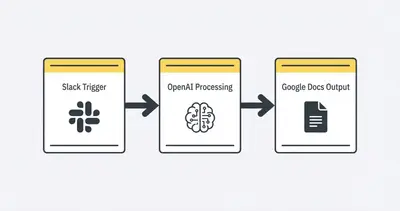
Step 2: Set Your Input Trigger
Your automation needs a starting point. How do you want to interact with your custom AI?
Instead of logging into a custom dashboard, you can use tools your team already relies on.
- Google Forms: Create a simple form where team members submit topics.
- Slack/Discord: Set up a dedicated channel where messages trigger the workflow.
- Webhook: Use an n8n webhook URL to trigger the automation from a custom internal dashboard.
Step 3: Configure the AI Node
This is where the magic happens. In your n8n canvas, add an Advanced AI node (or a standard HTTP request node if you prefer raw API control).
- Connect your API key to authenticate the node.
- Select your model (e.g.,
gpt-4oorclaude-3-5-sonnet-latest). - Write your System Prompt. This is crucial. Tell the AI exactly how to behave. (e.g., "You are an expert copywriter. Write concise, punchy emails. Never use the word 'delve.'")
- Pass your trigger data (from Step 2) into the User Prompt field.
Step 4: Route the Output
Where should the AI send the finished work? Add a final node to your workflow.
If the AI generated a blog post, route it to a draft in WordPress or Webflow. If it summarized a client email, send a Slack message to the account manager. If it extracted data from an invoice, log the totals in an Airtable database.
By automating the output, you eliminate the tedious copy-and-paste steps that SaaS wrappers usually require.
Real-World Examples: What You Can Replace Today
You can replicate dozens of popular AI tools using simple n8n workflow design patterns. Here are three high-impact examples.
Replace the SEO Writing Tool
The SaaS Wrapper: Charges $99/month for SEO-optimized articles. Your n8n Build:
- Trigger: A new row in Google Sheets containing a target keyword.
- Step 1: HTTP node searches the web for top-ranking articles on that keyword.
- Step 2: AI node analyzes the competitors and creates an outline.
- Step 3: Second AI node drafts the full article based on your specific brand voice guidelines.
- Output: Google Doc created with the final text. Cost: ~$0.15 per article.
Replace the Lead Qualifier Chatbot
The SaaS Wrapper: Charges $199/month for a "smart" website chatbot. Your n8n Build:
- Trigger: Webhook receives a new lead form submission.
- Step 1: AI node reviews the lead's company size, budget, and request.
- Step 2: AI scores the lead from 1-10 based on your ideal customer profile.
- Output: High scores trigger an instant calendar link email. Low scores trigger a polite rejection. Cost: ~$0.01 per lead.
Replace the Meeting Summarizer
The SaaS Wrapper: Charges $20/user/month to record and summarize calls. Your n8n Build:
- Trigger: Zoom cloud recording finishes uploading.
- Step 1: Whisper API transcribes the audio to text.
- Step 2: Claude 3.5 Sonnet extracts action items and decisions.
- Output: Summary emailed automatically to all meeting attendees. Cost: ~$0.50 per hour of meeting audio.
Pro Tip: When deciding to build vs buy, focus on volume. If a process happens hundreds of times a month, building your own API connection will yield massive savings.
When Should You Actually Pay for the SaaS Wrapper?
Building your own tools is powerful, but it isn't always the right choice. You should keep paying for the SaaS wrapper if:
- The UI is essential: If the tool provides a highly specific, interactive interface (like a complex video editing timeline or a specialized code editor), you cannot easily replicate that in n8n.
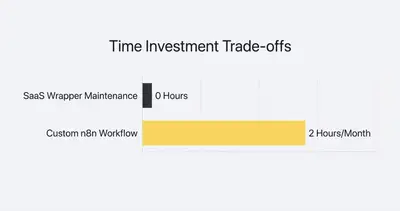
- You lack time for maintenance: APIs occasionally change. Nodes sometimes fail. If you own the workflow, you own the troubleshooting. If you don't have an hour a month to maintain your automations, stick to SaaS.
- The wrapper offers proprietary data: Some tools combine AI with their own massive, private databases. You cannot replicate this just by calling the OpenAI API.
However, if the tool simply takes text, modifies it, and spits out text—you should build it yourself.
Take Back Control of Your Tech Stack
You don't need a dozen different AI subscriptions eating away at your bottom line. By leveraging API keys and an automation platform like n8n, you can build custom tools that fit your business perfectly.
Start small. Pick one expensive, text-based AI wrapper your team uses today. Cancel the subscription, build the workflow in n8n, and watch your software costs plummet.
Key Takeaways:
- AI wrappers are often just user interfaces built on top of cheap APIs.
- Direct API calls cost pennies compared to expensive SaaS subscriptions.
- n8n allows you to build custom AI tools visually, without writing code.
- Building your own tools keeps your data private and integrates seamlessly with your existing software.
Ready to stop paying for expensive AI subscriptions and start building custom workflows that actually fit your business? Book a demo with Evalics today. We will help you audit your tech stack and replace costly wrappers with streamlined n8n automations.
Related Resources
- Build vs Buy When To Stop Paying For SaaS And Build It Yourself
- Stop Paying For 10 Different SaaS Tools Build Them In n8n
- True Cost Of AI Automation 2025
- What Is An API Key A Simple Guide For AI Automation
Official Sources
By Kevin Michael Schindler, AI Automation Expert at Evalics