You spend three hours every Monday staring at a blinking cursor, trying to map out this week's blog posts, LinkedIn updates, and email newsletter. You try asking ChatGPT to "write a month of content," but the result is a wall of generic, robotic corporate speak that sounds nothing like your brand.
Content creation is a massive bottleneck for small business owners. Traditional manual writing takes too long. One-click AI generation produces garbage.
The secret to scaling your content isn't finding a magical single prompt. It is breaking the creative process into an automated assembly line.
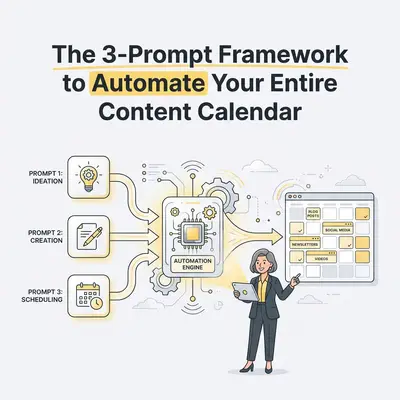
By separating your workflow into three distinct stages—Ideation, Drafting, and Repurposing—you can feed these steps into an automation tool like n8n or Make. This creates a self-sustaining content engine that actually sounds like you.
Here is exactly how to build the 3-Prompt Framework.
Why One-Click AI Content Always Fails
Most people fail at AI content because they ask the model to do too much at once.
When you ask an AI to brainstorm a topic, research the facts, adopt your brand voice, and format a 1,500-word blog post in a single prompt, the model hallucinates or defaults to its most generic training data. It loses the nuances of your specific instructions.
Key Insight: Human writers do not brainstorm, outline, draft, and format simultaneously. AI shouldn't either. You get higher quality output by chaining specialized prompts together.
Instead of one massive request, we split the job. We use one prompt to generate concepts, a second to write the core asset, and a third to slice that asset into social media posts.
Prompt 1: The Ideator (Building the Foundation)
The first step in your automation pipeline is idea generation. This prompt does not write the final content. It generates high-quality, targeted concepts based on your audience's pain points.
In your automation tool, set this prompt to run once a month. Have it pull a list of your target keywords or customer FAQs from a Google Sheet, then push the generated ideas back into that sheet for your approval.
The Ideator Prompt Template:
Act as an expert Content Strategist for a [Your Industry/Niche] business.
Your target audience is [Describe your target audience and their main pain point].

Review the following core topic: [Insert Topic/Keyword from database]

Generate 4 unique content angles for this topic. For each angle, provide:
1. A punchy, hook-driven working title.
2. The core argument or unique perspective (2 sentences).
3. 3 key takeaways the reader will get.

Do not write the article. Only provide the strategic outlines.
Quick Win: Hook this prompt up to a Slack or Discord channel. Every Monday morning, your automation can ping you with four fresh content angles. You just click a button to approve the one you like.
By reviewing the ideas before the drafting begins, you maintain editorial control. Once you approve an idea in your database, it triggers the second prompt.
Prompt 2: The Drafter (Matching Your Voice)
Now that you have a specific, approved angle, it is time to write the core asset. Usually, this is a long-form blog post or an in-depth newsletter.
To prevent the AI from sounding like a robot, you must provide a "voice reference." This is where you feed the AI 2-3 examples of your past writing so it can mimic your tone, sentence length, and vocabulary. If you struggle with getting the AI to follow these rules, a prompt engineering step-by-step checklist can help you lock in the parameters.
The Drafter Prompt Template:
Act as an expert copywriter. Your task is to write a comprehensive, engaging blog post based on the following approved outline:

[Insert Approved Outline from Prompt 1]

Here are the strict style guidelines you must follow:
- Write at a 6th-grade reading level.
- Keep paragraphs to 2-3 sentences maximum.
- Use active voice.
- Never use the words "delve," "leverage," "testament," or "landscape."
- Match the tone of this writing sample: [Insert 500 words of your best past content].

Write the full draft now, using clear H2 and H3 headings.
The output from this prompt will be 85% ready for publication. You will still need a human to read it, add specific personal anecdotes, and fact-check any claims. But you have just eliminated the blank page entirely. If you plan to scale this process, learning how to use markdown for blog posts ensures the AI formats your drafts perfectly for your CMS.
Prompt 3: The Repurposer (The Multiplier Effect)
Creating a great blog post is only half the battle. You need to distribute it.
Manually rewriting a blog post into LinkedIn updates, tweets, and email teasers takes hours. The Repurposer prompt automates this completely. In your workflow, this prompt triggers immediately after your final blog post is marked "Complete" in your database.
The Repurposer Prompt Template:
You are a Social Media Manager. Review the following completed blog post:

[Insert Completed Blog Post Draft from Prompt 2]

Repurpose this long-form content into the following 3 formats:

1. A LinkedIn Post: Start with a contrarian hook. Break the core concept down into a bulleted list. End with a question to drive comments. Keep it under 200 words.
2. A Short Email Newsletter: Write a conversational, 150-word teaser that introduces the problem and links out to the full article. Provide the subject line.
3. 3 X (Twitter) Posts: Extract the three most impactful standalone quotes or statistics from the article.

Do not add new information. Only use facts present in the source text.
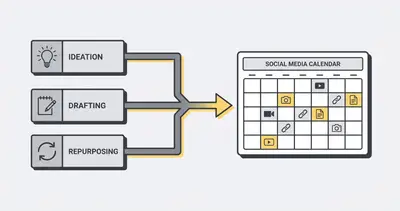
With this final prompt, a single approved idea has multiplied into a blog post, a newsletter, and five social media updates. This is the exact process we use when automating blog post writing for maximum output.
Tying It All Together: The Automation Tech Stack
You can copy and paste these prompts manually into ChatGPT, but true efficiency comes from linking them together in a workflow tool.
Here is a simple, cost-effective tech stack to automate this calendar:
- The Database (Airtable or Google Sheets): This is your control center. You create columns for "Keyword," "Approved Outline," "Draft," and "Social Posts."
- The Automation Tool (Make or n8n): This is the glue. It watches your database. When a new row is added, it triggers the API calls.
- The AI Engine (OpenAI API or Anthropic API): This processes the prompts. We recommend Claude 3.5 Sonnet for drafting because it handles tone and nuance better than most models.
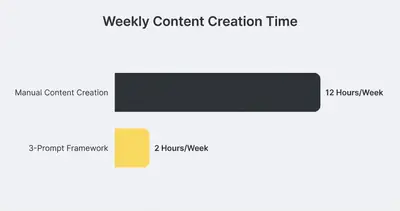
Reality Check: Setting up this automated pipeline will take you 4-6 hours initially. You will need to test and tweak your voice references. But once it is running, you will save 10+ hours every single week.
If you want to build this internally without paying steep monthly subscription fees, you should look into Make vs n8n 2025 AI automation comparison to choose the right visual workflow builder for your business.
Keeping the Human in the Loop
Automation does not mean abdication. Do not wire this system directly to your WordPress or LinkedIn accounts to auto-publish without review.
The 3-Prompt Framework is a drafting engine, not a final publisher. You are still the editor-in-chief. Your job transitions from typing every word to reviewing, injecting your unique personal experiences, and clicking "Approve."
If you notice the AI output getting stale or repetitive, it means your voice reference or base context needs updating. Treat your prompts like employees—if they are underperforming, give them better instructions. This is a core principle of prompt engineering for automation.
The Bottom Line
You do not need to hire a massive content team to maintain an active online presence. You just need a smarter system.
By breaking the writing process into Ideation, Drafting, and Repurposing, you force the AI to focus on one specific task at a time. This drastically improves the quality of the output and allows you to fill a month's content calendar in a single afternoon.
Stop doing the heavy lifting yourself. Build the framework, automate the handoffs, and get back to actually running your business.
Ready to automate your content pipeline but don't want to build it yourself? Book a demo with Evalics and let our team design a custom AI content engine for your brand.
By Kevin Michael Schindler, AI Automation Expert at Evalics
Related Resources
- Prompt Engineering Step By Step Checklist
- Automating Blog Post Writing Ai N8n
- Make Vs N8n 2025 Ai Automation Comparison
- Prompt Engineering For Automation How To Get Better Results From Ai In Your Workflows