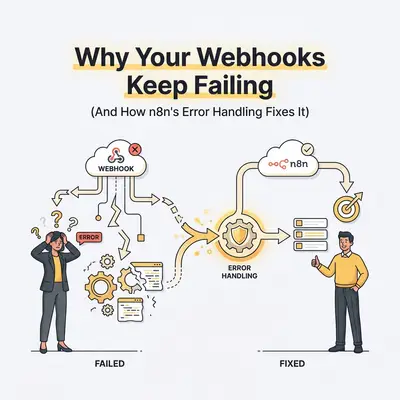
You just launched a major marketing campaign. Leads are pouring in from your Facebook Ads. But when you check your CRM at the end of the day, a dozen high-ticket prospects are missing.
The culprit? A failed webhook.
Webhooks are the backbone of real-time automation. They act as instant messengers between your apps. When a customer buys a product, Stripe sends a webhook to your automation platform to create an invoice.
But webhooks are also fragile. If your automation platform takes too long to respond, or if the incoming data format changes slightly, the webhook drops the data. It disappears into the void. No error notification. No retry. Just lost revenue.
If you rely on webhooks to run your business, you cannot afford silent failures. Here is why your webhooks keep breaking, and exactly how n8n's advanced error handling helps you catch every single payload.
The Anatomy of a Webhook Failure
To fix a failing webhook, you must understand why it broke in the first place. Webhooks usually fail for one of three reasons:
1. The Timeout Error (504 Gateway Timeout) The sending app (like Shopify or Stripe) shoots a payload of data to your webhook URL. It expects a quick "I got it!" response (a 200 OK status code). If your workflow starts processing heavy tasks—like generating a PDF or querying an AI model—before sending that response, the sending app gets impatient. It times out, assumes the delivery failed, and drops the connection.
2. Malformed Payloads You expect the webhook to send a clean email address. Instead, a user inputs an emoji, or the third-party app changes its JSON structure without warning. Your workflow tries to map a field that no longer exists, and the entire process crashes.
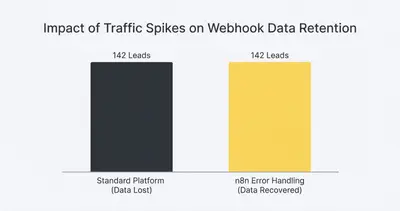
3. Volume Spikes Your webinar goes viral. Instead of receiving two webhooks a minute, your system gets hit with 200 webhooks a second. Your database gets overwhelmed, API rate limits are exceeded, and the server refuses the connection (429 Too Many Requests).
Reality Check: Standard automation platforms will often automatically disable your workflow if it registers too many consecutive errors. This means a temporary API glitch can shut down your entire lead capture system for hours until you manually turn it back on.
The Silent Killer: Why Basic Platforms Drop Data
Most beginner automation tools hide the complexity of webhooks. This makes them easy to set up, but incredibly difficult to troubleshoot when automation stops working.
If a step fails halfway through a linear workflow, the data is trapped. You might get an email saying "Task Failed," but you cannot easily extract the original webhook payload to rerun it. The lead is gone.
You need a system that anticipates failure. You need a way to catch the raw data before it processes, and a fallback route for when things break.
This is where n8n completely changes the game.
How n8n Error Handling Fixes Broken Webhooks
n8n treats errors as just another path in your workflow. Instead of crashing the entire sequence, n8n allows you to route failed executions gracefully.
Here are the specific tools n8n gives you to build bulletproof webhooks.
1. The "Respond to Webhook" Node
This is your best defense against timeout errors. By default, n8n responds to a webhook only after the entire workflow finishes.
But you can change this. You can place a "Respond to Webhook" node immediately after your webhook trigger. This instantly sends a "200 OK" message back to the sender. The sender is happy, the connection closes, and your workflow can take as much time as it needs to process the data in the background.
2. The "Continue On Fail" Toggle
In n8n, every single node has a settings tab. Inside, you will find a toggle called "Continue On Fail."
If a specific API call fails (like trying to enrich an email address), the workflow doesn't stop. It simply outputs the error data and moves to the next node. You can then use a Switch node to check if an error occurred. If it did, route the workflow to send a Slack alert, but continue processing the rest of the valid data.
3. The Error Trigger Node
This is n8n's ultimate safety net. You can create a dedicated "Error Management" workflow.
It starts with the "Error Trigger" node. In your main webhook workflows, you go to workflow settings and select this error workflow as your fallback. Now, if your main webhook workflow crashes for any unhandled reason, n8n automatically packages the original webhook data, the error message, and the exact node that failed, and sends it to your Error Management workflow.
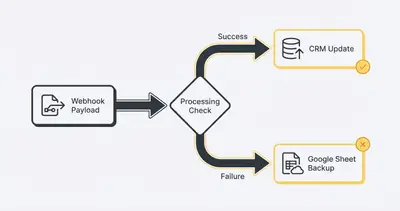
Pro Tip: Set up your Error Trigger workflow to instantly log the failed payload into a Google Sheet or Airtable base. This creates a "Dead Letter Queue." You never lose the raw data, and you can manually retry the leads later.
Building a Bulletproof Webhook Workflow (Step-by-Step)
Let's apply these features. Here is how you build a webhook workflow in n8n that simply will not lose data.
Step 1: Capture and Respond
Start with your Webhook trigger node. Immediately attach a "Respond to Webhook" node. Set the response body to a simple JSON success message.
This guarantees you will never suffer a 504 Gateway Timeout again, no matter how complex the rest of the workflow is.
Step 2: Validate the Payload
Do not trust incoming data. Use an IF node or a Switch node to check the payload.
Does the payload actually contain an email address? Is the email format valid? If the data is missing or malformed, route it to a Slack notification node that alerts you: "Bad data received from Shopify webhook."
Cleaning up messy data early is the switch node secret to keeping automations stable.
Step 3: Handle API Failures Gracefully
Next, add your main action—like pushing the lead to Salesforce.
Go to this node's settings and turn on "Continue On Fail." Then, add an IF node right after it. Configure it to check for the presence of an error object in the output.
If it finds an error (maybe Salesforce is undergoing maintenance), route the workflow to save that specific lead's data into a local database or Google Sheet.
Step 4: Set Up the Global Safety Net
Create a brand new workflow. Add the Error Trigger node. Connect it to an email node or a Slack node.
Format the message to include {{ $json.workflow.name }} and {{ $json.execution.error.message }}.
Finally, go back to your main webhook workflow settings and set this new workflow as your default Error Workflow. You now have a global safety net that catches catastrophic failures.
Advanced Webhook Tricks for Scale
When your business scales, your webhooks will get hit harder. Basic error handling is step one. Step two is architecture.
If you are expecting massive spikes in traffic—like a Black Friday sale—standard webhook processing might still overwhelm your server CPU.
To solve this, you need to decouple the receiving of data from the processing of data.
You achieve this using n8n queue mode. Instead of processing workflows directly on your main n8n instance, queue mode relies on Redis to capture webhooks instantly. Redis stores the payloads in a lightning-fast queue. Then, separate n8n worker nodes pull those payloads from the queue at a safe, controlled pace.
Even if you get 10,000 webhooks in a single minute, Redis absorbs the shock. Your worker nodes steadily process the backlog without crashing. Your CRM doesn't get rate-limited, and not a single webhook is dropped.
Key Insight: Queueing architectures used to require dedicated engineering teams. With n8n, small businesses can deploy enterprise-grade data queues to protect their revenue streams from traffic spikes.
Stop Guessing, Start Catching
Webhooks are incredible tools, but treating them like infallible magic will cost you money. Servers go down. APIs change. Traffic spikes.
If you build automations assuming everything will go right, your workflows will break exactly when you need them most.
By utilizing n8n's Error Trigger, immediate webhook responses, and granular failure routing, you stop guessing why your data is missing. You turn silent, invisible failures into managed, actionable alerts. You keep your data, you keep your leads, and you keep your business running.
Ready to bulletproof your business automations? Stop losing leads to bad webhooks. Book a demo with Evalics today, and let's build infrastructure that scales with you.
By Kevin Michael Schindler, AI Automation Expert at Evalics
Related Resources
- The Switch Node Secret How to Clean Up Your Messy Automations
- How to Debug Automation When It Stops Working Troubleshooting Guide Non Technical Users
- n8n Queue Mode Explained Scale Workers and Avoid Pitfalls
- N8n Workflow Design Patterns Error Handling Production Setup
Official Sources
- n8n Official Documentation: Error Handling Concepts
- Mozilla Developer Network (MDN): HTTP Status Codes
- n8n Official Documentation: Respond to Webhook Node