
Your automation tool should save you money. But right now, it might be penalizing your success.
You built a simple workflow to handle customer onboarding. It worked perfectly. Then your business grew. You added more steps to the workflow: data formatting, conditional logic, CRM updates, and email notifications. Suddenly, your monthly automation bill jumped from $49 to $299. Then to $739.
You are experiencing the "Task Tax."
When you use platforms that charge per step, your automation costs scale linearly with your complexity. The more efficient and automated you become, the more you pay. This breaks the fundamental promise of automation.
If you are tired of upgrading your pricing tier just to keep the lights on, it is time for a new strategy. Here is your complete guide to escaping the task-based pricing trap and migrating your operations to n8n.
Understanding the "Task Tax"
To understand why your bills are skyrocketing, you need to look at how different platforms calculate usage.
Zapier charges per task. A task is defined as any successful action your workflow performs after the initial trigger.
Consider a standard lead processing workflow:
- Trigger: New Facebook Lead (Free)
- Action: Format the phone number (1 Task)
- Action: Search CRM for existing email (1 Task)
- Action: Add to CRM if new (1 Task)
- Action: Send Slack notification (1 Task)
- Action: Send welcome email (1 Task)
Every time this single workflow runs, it costs you 5 tasks. If you process 2,000 leads a month, that is 10,000 tasks. Add a few more workflows for invoicing, social media posting, and customer support, and you quickly blow past the 50,000 task limit.
Reality Check: Traditional task-based pricing models discourage you from building robust, error-proof workflows. Users often avoid adding necessary data validation or error-handling steps just to save money on their monthly bill.
The n8n Difference: Executions vs. Tasks
This is where n8n completely changes the math.
Instead of charging per individual step, the n8n cloud version charges per execution. An execution is one complete run of a workflow, regardless of how many steps, API calls, or formatting nodes it contains.
That 6-step lead processing workflow? In n8n, it counts as exactly 1 execution.
Even better, n8n offers a source-available version that you can self-host. If you host it on your own server, there are zero arbitrary execution limits. You only pay for your server hosting (typically $5 to $20 a month) and you can run millions of steps.
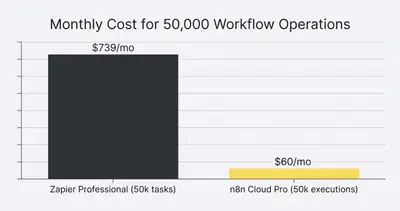
The financial difference is staggering. But moving your entire business infrastructure to a new platform requires careful planning. You cannot just flip a switch.
Phase 1: Audit and Triage
Before you cancel your current subscription, you need total visibility into what you are actually running. Do not blindly recreate every existing workflow. This is your opportunity to clean house.
1. Identify Your Heavy Hitters
Log into your dashboard and sort your automations by task usage. Look for the top 20% of workflows that consume 80% of your quota. These are your primary migration targets. Moving just two or three high-volume processes to n8n will immediately drop your bill.
2. Spot the "Filter Drains"
Look for workflows that trigger frequently but stop at a filter step most of the time. In task-based models, if a workflow triggers and hits a filter that stops it, that filter often counts as a task. In n8n, you can handle complex routing without burning your budget.
3. Archive the Ghosts
You likely have dozens of old automations running that no one actually uses. They push data to legacy spreadsheets or notify Slack channels that have been muted for a year. Turn them off. If no one complains after a week, delete them entirely.
Quick Win: Export a list of all active integrations. Group them by department (Marketing, Sales, Operations). This will help you tackle the migration systematically rather than jumping between random disconnected systems.
Phase 2: Building Your n8n Infrastructure
Once you know what to move, you need to decide how to run n8n. You have two main paths: Cloud or Self-Hosted.
The Cloud Route
If you lack a technical background and do not want to manage servers, n8n Cloud is the fastest path forward. It provides the execution-based pricing advantage without the IT overhead. You still get predictable pricing, and you can start building immediately.
The Self-Hosted Route
If you want total control, zero execution limits, and maximum data privacy, self-hosting is the way to go. You can deploy n8n on platforms like DigitalOcean, AWS, or Railway. It requires some basic command-line knowledge, but there are dozens of templates available that make setup take less than 15 minutes.
Pro Tip: If you are unsure, start with n8n Cloud. You can easily export your workflows as JSON files later and import them into a self-hosted instance when you are ready to scale up.
If you are managing automation for clients, building a self-hosted instance protects your margins immensely.
Phase 3: The Migration Strategy
Do not try to move everything in one weekend. Migrating core business logic requires a systematic approach to prevent dropped data.
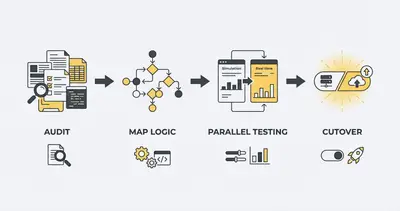
Step 1: Map the Logic, Not the Steps
Task-based tools force you to build in a straight line. n8n allows for multi-branch routing, looping, and advanced data manipulation.
Do not just copy your old workflow step-for-step. Instead, map out the ultimate business goal. You will often find that a clumsy 12-step linear workflow can be condensed into a clean, 4-step branching workflow in n8n.
Step 2: Master the Core Nodes
Before you start rebuilding complex API calls, get comfortable with n8n's foundational data manipulation nodes. The Switch node, the Merge node, and the Set node will be your best friends.
If you are struggling with messy branching logic, learning the Switch Node secret will save you hours of maintenance time.
Step 3: Run Parallel Tests
Never turn off a critical business workflow until the replacement is verified.
- Build the new workflow in n8n.
- Set the trigger to run alongside your old workflow.
- Instead of updating live data (like sending an email or updating CRM), have the n8n workflow log its output to a test spreadsheet or Slack channel.
- Compare the test outputs to your live outputs for 48 hours.
Step 4: The Cutover
Once you confirm the data matches perfectly, schedule a cutover. Do this during low-traffic hours. Turn off the old automation, switch the n8n workflow to output to your live systems, and monitor it closely for the first hour.
Navigating the Challenges
Switching to n8n is incredibly rewarding, but it is not without friction. Be prepared for a shift in how you build.
The Data Structure Curve
Zapier hides the underlying API data structures from you. It gives you neat little form fields to fill out. n8n exposes the raw JSON data.
At first, looking at JSON arrays might feel intimidating. But this exposure is exactly what gives you more power. You will quickly learn how to extract nested data and map complex variables. Once you understand the basics of JSON, you will never want to go back to restrictive form fields.
API Connections
While n8n has hundreds of built-in integration nodes, its library is smaller than Zapier's massive catalog. However, n8n includes an incredibly powerful "HTTP Request" node.
If an app has an API, you can connect to it in n8n. You are no longer restricted to the platforms your vendor officially supports. This allows you to integrate niche software and custom internal tools seamlessly. If you find yourself doing this often, you can read our guide to building your first workflow to master API basics.
Example: An agency using a proprietary real estate CRM could not automate their lead flow because their old tool did not officially support the CRM. By switching to n8n, they simply used the HTTP Request node to POST data directly to the CRM's open API, eliminating three hours of daily manual entry.
When Not to Switch
Transparency is critical. While n8n is powerful, it is not the perfect fit for every single scenario. You should hold off on your escape plan if:
- You rarely hit your limits. If you are paying $20 a month and only running 500 simple tasks, the time investment to learn a new platform will not yield a meaningful ROI.
- Your team refuses to learn. n8n requires a slightly more analytical mindset. If your team struggles with basic logic or refuses to read documentation, introducing a node-based tool will cause frustration.
- You need rapid, disposable automations. If you frequently spin up temporary, one-off automations for single events and delete them a week later, traditional point-and-click tools might be faster for your specific style.
But for businesses that rely on automation as a core operational pillar, these exceptions rarely apply.
The Bottom Line
Your technology stack should accelerate your growth, not tax it. When you are penalized for adding safety checks, error handling, and complex logic to your workflows, your business operations suffer.
Migrating to n8n allows you to decouple your automation strategy from restrictive pricing tiers. Whether you opt for their predictable cloud pricing or take full control with a self-hosted instance, you unlock the ability to build the workflows your business actually needs.
It takes time to learn the ropes. It takes effort to map the logic. But reclaiming your profit margins and gaining total operational control is worth the transition.
Stop compromising your workflows to save tasks. Start building systems that scale with you.
Conclusion
Breaking free from task-based pricing models is a massive step toward mature business operations. By migrating your heavy workflows to n8n, you stop paying a tax on your own efficiency.
Key Takeaways:
- Task-based pricing penalizes complex, multi-step workflows by charging for every action.
- n8n charges per complete execution (or offers unlimited runs if self-hosted), dropping costs drastically.
- Always migrate strategically: audit your usage, map your logic visually, and run parallel tests before cutting over.
- Embrace the learning curve. Understanding JSON and basic HTTP requests opens up infinite integration possibilities.
Are you ready to escape the task tax but don't have the time to rebuild your infrastructure? Stop letting manual processes and expensive software hold back your scaling efforts. Book a demo with Evalics today, and let us map out your custom migration strategy.
Related Resources
- Make vs n8n 2025 AI Automation Comparison
- Stop Paying for Zapier 5 n8n Workflows Every Agency Needs
- Self Hosted n8n vs Cloud Which Protects Margins
- N8n For Beginners Blueprint Build First Workflow
Official Sources
- n8n Cloud Pricing & Executions
- Zapier Task Usage and Pricing Constraints
- n8n Self-Hosting Documentation
- Understanding APIs and JSON Data
By Kevin Michael Schindler, AI Automation Expert at Evalics