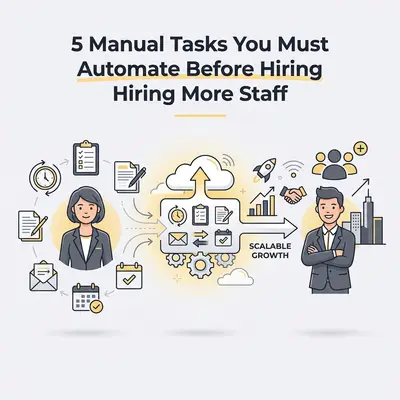
You are drowning in work. Your inbox is overflowing, your to-do list is three pages long, and you missed dinner with your family twice last week. Your instinct tells you the solution is obvious: "I need to hire someone."
Pause right there.
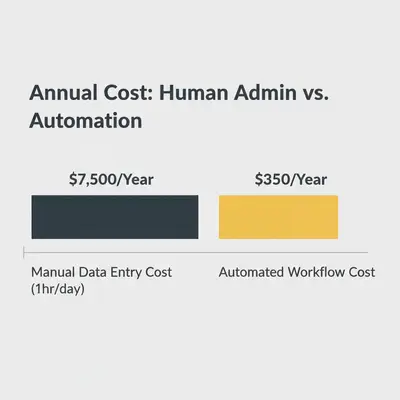
Hiring is the most expensive and complex solution to a capacity problem. Between salaries, taxes, equipment, training, and management overhead, a single mid-level hire can cost your business $60,000 to $80,000 in their first year. If that new hire spends their day copy-pasting data or chasing invoices, you are effectively burning capital.
The "Delegate to Software First" rule is the secret weapon of high-margin small businesses. (Delegate to Software First rule) Before you write a job description, you must ensure that you aren't hiring a human to do a robot's job. (AI agent)
Here are the five manual tasks you must automate before adding headcount to your payroll.
1. Lead Data Entry and Qualification
If you or your sales team spends time manually copying lead details from a contact form into a spreadsheet or CRM, you are wasting valuable closing time. Human data entry is slow, prone to typos, and frankly, boring.
Worse, speed to lead is critical. If a lead waits four hours for you to manually see the email and enter them into your system, they have likely already contacted your competitor.
The Automated Workflow
Connect your lead sources (website forms, Facebook ads, Typeform) directly to your CRM using an automation tool like Make or n8n.
- Trigger: A new lead fills out a form.
- Action: The automation tool cleans the data (standardizing phone numbers, fixing capitalization).
- Action: It creates a new contact in your CRM (HubSpot, Salesforce, Pipedrive).
- Action: It sends a Slack or Teams notification to your sales rep instantly.
Quick Win: Add an AI qualification step. Have the automation send the lead's inquiry to OpenAI to score the lead based on their message and company size before it even hits your CRM.
receipt
2. Appointment Scheduling and the "Email Ping-Pong"
"Does Tuesday at 2 PM work?" "No, how about Wednesday?" "Wednesday works, but only after 4 PM." "Actually, something just came up..."
This back-and-forth exchange is a productivity killer. It interrupts your focus and adds zero value to the actual meeting. If you are hiring an administrative assistant primarily to manage calendars, you are solving the wrong problem.
The Automated Workflow
Use a scheduling tool (Calendly, Cal.com) integrated with your calendar and video conferencing software (Zoom, Google Meet).
- Trigger: You send a link (or an AI agent sends it for you).
- Action: The client selects a time that works for them based on your real-time availability.
- Action: The tool creates the calendar event, generates the Zoom link, and sends invite emails to both parties.
- Action: It sends automated reminders 24 hours and 1 hour before the meeting to reduce no-shows.
Pro Tip: Don't just send a raw link. Use an automation that detects when a lead asks for a meeting in an email and replies with a polite, pre-written message containing your booking link.
3. Invoicing and Payment Chasing
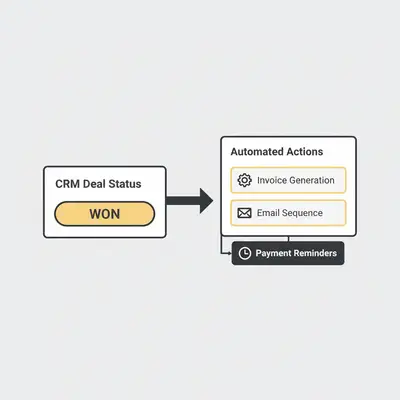
Chasing money is uncomfortable and time-consuming. Many small business owners delay sending invoices because they are "too busy," leading to cash flow crunches. Or worse, they hire a bookkeeper just to send "Overdue Payment" emails.
Software doesn't feel awkward about asking for money, and it never forgets a due date.
The Automated Workflow
Integrate your project management tool or CRM with your accounting software (Xero, QuickBooks, Stripe).
- Trigger: A deal is marked "Closed Won" or a project is marked "Complete."
- Action: The system automatically generates an invoice with the correct line items and client details.
- Action: It emails the invoice to the client.
- Action: If payment isn't received by the due date, the system sends a polite reminder series (e.g., at 3 days, 7 days, and 14 days overdue).
Automating this ensures your cash flow remains healthy without you having to play "bad cop" with your clients.
receipt
4. Social Media Distribution
Marketing is essential, but the logistics of posting are manual drudgery. Logging into LinkedIn, then Twitter, then Instagram, formatting images, and pasting text takes hours every week. A Social Media Manager is a great hire for strategy and creation, but they shouldn't be paid to simply push "Post."
The Automated Workflow
Batch your content creation, then let automation handle the distribution.
- Trigger: You add a new content idea or draft to a Notion database or Google Sheet.
- Action: An AI agent (using GPT-4 or Claude) drafts the captions for different platforms based on your notes.
- Action: You approve the content with a single click.
- Action: The automation schedules and posts the content to all platforms at optimal times.
This transforms social media from a daily chore into a weekly strategic session.
Key Insight: Consistency beats intensity. Automation ensures you post every day, even when you get busy with client work.
5. Client Onboarding and Reporting
You've closed the deal—congratulations! Now comes the scramble: sending the welcome packet, getting contracts signed, setting up project folders, and granting software access. If you do this manually, it's inconsistent and slow.
Similarly, monthly reporting is often a dreaded end-of-month task where you screenshot analytics and paste them into a PDF.
The Automated Workflow
Create a "New Client" trigger in your CRM that sets off a chain reaction.
- Trigger: Deal status changes to "Signed."
- Action: DocuSign sends the contract automatically.
- Action: Google Drive creates a shared folder structure for the client.
- Action: An email sequence sends the welcome kit, login details, and "what to expect" guide.
- Action (Monthly): A scheduled automation pulls data from your ads manager or analytics tools, populates a Google Slide template, converts it to PDF, and drafts an email for you to review and send.
This creates a "Fortune 500" experience for your clients while requiring zero manual effort from you.
The Cost of Waiting vs. Automating
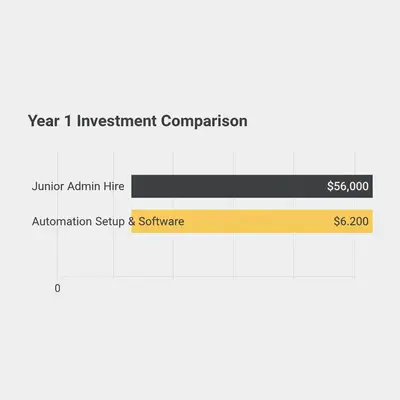
Many business owners hesitate because they think setting up these automations is "technical" or expensive. Let's look at the math.
-
Option A: Hire an Admin Assistant.
- Salary: $45,000/year
- Taxes & Benefits: +$9,000/year
- Equipment: +$2,000
- Total Year 1 Cost: ~$56,000
- Time to Productivity: 2-3 months
-
Option B: Build an Automation Suite.
- Software Costs (Make, CRM, OpenAI): ~$1,200/year
- Setup Time (DIY or Consultant): One-time investment of $2,000 - $5,000
- Total Year 1 Cost: ~$6,200
- Time to Productivity: 2-4 weeks
You save nearly $50,000 in the first year. More importantly, you build an asset. Employees can quit; your automation workflow belongs to your company forever.
receipt
When Should You Actually Hire?
Automation isn't about eliminating humans; it's about elevating them. You should hire when:
- The work requires creative judgment: Writing high-level strategy, designing complex visuals, or solving unique client problems.
- The work requires deep relationships: Sales closing calls, partnership negotiations, or empathetic customer support for complex issues.
- You have automated the rote tasks: Your new hire can step immediately into high-value work instead of drowning in data entry.
Conclusion
Before you post that job ad, audit your workload. If the tasks keeping you busy are repetitive, rule-based, and digital, they are candidates for automation, not delegation.
By automating these five areas—leads, scheduling, billing, social distribution, and onboarding—you reclaim 15-20 hours a week. That's effectively a part-time employee, for the cost of a few software subscriptions.
Build the machine first. Then hire people to drive it.
Related Resources
- Make vs n8n: 2025 AI Automation Comparison
- How to Get Leads with AI
- AI Won't Replace You, But Someone Using AI Will
Official Sources
- Zapier's Guide to Business Automation
- HubSpot: The Benefits of Sales Automation
- McKinsey: The Future of Work and Automation