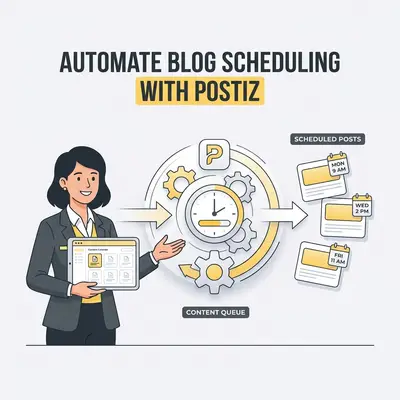
Automating blog scheduling is the process of using software to automatically publish your website content to social media platforms at pre-set times. For small business owners, this eliminates the daily manual labor of logging into multiple accounts, ensuring your brand maintains a consistent presence without requiring your constant attention.
Why Should Small Businesses Automate Blog Scheduling?
Automating your blog distribution allows you to maintain a consistent online presence without the daily manual labor of logging into platforms. By using tools like Postiz, you ensure your content reaches your audience at peak engagement times. This frees up your schedule to focus on core business operations rather than administrative posting tasks.
Consistency is what social platforms reward, and manual posting is the first thing to slip when a week gets busy. Automation is not about replacing your voice; it is about making sure it keeps showing up.
What Is Postiz and How Does It Simplify Content Management?
Postiz is an AI-powered social media management and scheduling platform designed to streamline the distribution of your blog content across multiple channels simultaneously. It simplifies management by centralizing your content calendar, providing AI-driven caption generation, and offering analytics that help you understand which blog topics resonate most with your specific target audience.
By consolidating your social media workflow into one dashboard, Postiz reduces the time spent switching between tabs. It acts as a central hub where you can draft, schedule, and analyze your content performance, ensuring that every blog post you write reaches its full potential across LinkedIn, X, Instagram, and Facebook.
How Do You Prepare Your Blog Content for Automation?
Before you can schedule your posts, you must ensure your content is optimized for social media consumption. This involves creating compelling summaries, selecting high-quality visuals, and identifying the primary call-to-action (CTA) for each blog post to ensure that your automated efforts drive actual traffic back to your website.
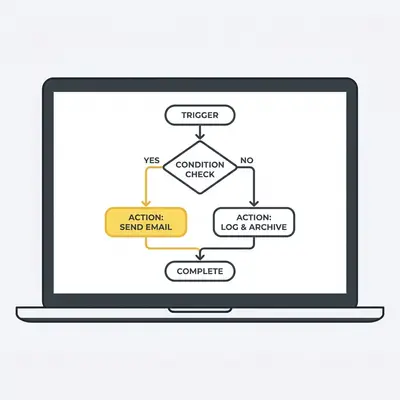
Focus on creating "social-first" snippets. Instead of just sharing a link, write a 2-3 sentence hook that addresses a specific pain point your blog post solves. Pair this with a high-quality image or a short video clip to stop the scroll. Always include a clear link to your site.
How Do You Connect Your Social Channels to Postiz?
Connecting your social channels is the foundational step that allows Postiz to act as the bridge between your website and your audience. You simply navigate to the "Accounts" tab in your Postiz dashboard, select the platforms you wish to integrate, and authorize the connection to grant the tool permission to publish on your behalf.
Once connected, Postiz maintains a secure link to your profiles. This allows you to manage all your social media assets from a single interface. You only need to perform this setup once, and the platform will handle the authentication tokens for your various social media accounts automatically.
What Are the Steps to Schedule Your Blog Posts Using Postiz?
To schedule your blog posts effectively, follow these steps to ensure a seamless workflow:
- Log into your Postiz dashboard and select the "Create" or "New Post" button.
- Paste the URL of your published blog post into the editor.
- Use the AI assistant to generate engaging captions and relevant hashtags.
- Upload or select a featured image that aligns with your brand identity.
- Choose the specific social media channels where you want the post to appear.
- Select the "Schedule" option and pick the date and time for publication.
- Review your content calendar to ensure the timing aligns with your overall marketing strategy.
Pro Tip: Use the "Auto-Schedule" feature in Postiz to let the AI determine the best times to post based on your historical engagement data.
What Common Pitfalls Should You Avoid When Automating?
The most common pitfall is "set it and forget it" syndrome, where business owners stop engaging with comments or monitoring performance. To avoid this, ensure you check your Postiz dashboard at least once a week to respond to audience interactions and adjust your future content strategy based on the performance metrics provided by the tool.
Automation should never replace human connection. If a follower asks a question in the comments, respond personally. Use the time you saved through automation to build relationships with your community. If you ignore your audience, your automated posts will eventually lose their effectiveness and reach.
![_ [GRAPH] Column chart. Create - 20%. Schedule - 20%. Engage - 30%. Analyze - 30%. Chart title: The Content Loop at top. Alt text: Infographic showing the content loop of Create, Schedule, Engage, and Analyze, emphasizing that engagement and analysis are the most critical parts of the process](/blogs/automate_blog_scheduling/-graph-column-chart-create-20-schedule-20-engage-3-400w.webp)
How Can You Optimize Your Workflow for Long-Term Success?
Optimizing your workflow involves batching your content creation and scheduling sessions to maximize efficiency. By dedicating a few hours once a month to load your blog posts into Postiz, you create a predictable rhythm that keeps your brand top-of-mind for customers without the stress of last-minute content creation.
Evalics Insight: Automation is not about replacing your voice; it is about amplifying it. Use the time saved to engage directly with your community.
Start by creating a content calendar in a simple spreadsheet. Once your blog posts are written, spend one afternoon scheduling them for the entire month. This "batching" approach prevents the mental fatigue of daily content creation and ensures your social media presence remains steady even during your busiest business weeks.
Practical Next Steps
To get started with automating your blog scheduling, follow these immediate actions:
- Audit your current social media: Identify which platforms drive the most traffic to your blog and prioritize those in Postiz.
- Set up your RSS feed: Configure Postiz to monitor your blog's RSS feed so you never miss an opportunity to share new content.
- Schedule your next three posts: Don't try to automate everything at once. Start by scheduling your next three blog posts to get comfortable with the interface.
- Review your analytics: After two weeks, check the Postiz dashboard to see which posts performed best and adjust your future captions accordingly.
Related Resources
- automate-social-media-scheduling-small-business — Automate Social Media: 5 Ways to Save Hours Weekly
- automate-blogging-with-telegram-and-vps — How to Build a 24/7 Automated Blogging System
- postiz-automate-social-media-posts — Automate Social Media Posts with Postiz: A Complete Guide