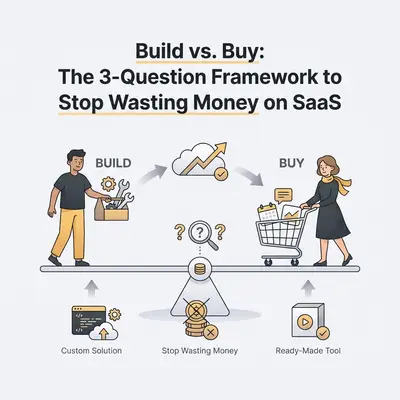
You review your credit card statement at the end of the month. You see $149 for a scheduling tool. You spot $299 for an email sequencer. There is another $49 for a dedicated client portal.
Your software stack is bleeding your margins dry.
Most businesses default to buying a new SaaS tool for every minor problem. They assume paying a monthly subscription is the fastest way to solve a bottleneck. But as your team grows, those $49 per-user fees multiply. You end up with 15 different applications that refuse to communicate with each other.
Eventually, you pay an "integration tax"—buying yet another tool just to force the first 15 tools to share data.
You do not need more software. You need a reliable framework to decide when to open your wallet, and when to build the solution yourself. Use this three-question framework to stop SaaS bloat and protect your revenue.
Question 1: Is This Process a Commodity or a Competitive Advantage?
The first rule of the build vs. buy decision is evaluating the strategic value of the process. Not all business workflows are created equal.
If a process is a standard requirement for every business on earth, it is a commodity. You should buy it. Do not attempt to build your own accounting software. Do not build a custom Customer Relationship Management (CRM) platform. Companies like HubSpot, QuickBooks, and Stripe spend billions perfecting these core infrastructures. Pay them for their expertise.
However, if a process defines how you deliver value to your specific clients, it is a competitive advantage. You should build it.
Consider how your agency onboards high-ticket clients. You might need to send a specific welcome packet, provision a Google Drive folder, notify a dedicated Slack channel, and draft a personalized kickoff agenda. Off-the-shelf onboarding software will force you to change your unique process to fit their rigid templates.
Key Insight: If you have to adapt your business process to fit the software, you bought the wrong tool. Custom processes require custom automations.
When the workflow is unique to your operational style, building a custom workflow in a platform like n8n gives you complete control. You can learn more about identifying these core processes in our guide on the 80/20 rule of business automation.
Question 2: What is the 24-Month Total Cost of Ownership (TCO)?
SaaS companies are masters of pricing psychology. A $99/month subscription feels like an easy impulse buy. Building a custom solution might cost $1,500 in upfront agency fees or dedicated internal time.
The SaaS option looks cheaper on day one. But business is not played in days. Look at a 24-month horizon.
Let's compare a niche SaaS reporting dashboard for a 10-person team versus building a custom automation that pulls data into Looker Studio.
The SaaS TCO Scenario
- Base Subscription: $99/month
- Per-user fee (10 users at $20/user): $200/month
- Total monthly cost: $299
- 24-Month Total: $7,176
The Build TCO Scenario
- Upfront development (Internal time or agency): $1,500
- Platform hosting (e.g., n8n cloud): $20/month
- Annual maintenance/adjustments: $500
- 24-Month Total: $2,480
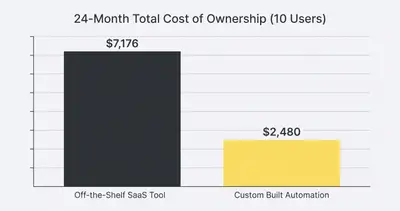
Building custom workflows requires a higher upfront investment of time or capital. But the ongoing costs scale beautifully. SaaS per-seat pricing penalizes you for growing. If you hire 10 more people, your SaaS bill doubles. If you hire 10 more people using a custom n8n workflow, your software cost remains exactly the same.
Reality Check: Do not forget to factor in maintenance when building. APIs change. Webhooks break. A custom build is never a "set it and forget it" project. Always allocate 15-20% of the initial build cost for annual upkeep. Read more about these realities in our guide to hidden AI automation costs.
Question 3: Do You Have an Existing Automation Hub?
The build vs. buy calculation changes drastically based on your current technology stack.
If "building" means hiring a developer to write thousands of lines of custom Python code and host it on AWS, you should probably just buy the SaaS tool. The technical debt and maintenance burden of raw code will crush a small business.
But modern businesses do not build from scratch anymore. They use automation hubs.
If you already have a workflow engine like n8n or Make running in your business, the marginal cost to build a new solution drops close to zero. You already pay for the infrastructure. You already know how the platform works. Adding a new workflow to replace a $100/month SaaS tool might only take your team two hours.
When evaluating a new software need, ask yourself: Can I recreate 80% of this tool's functionality using my existing automation platform?
Most niche SaaS tools are just a user interface wrapped around three basic API calls. A tool that "automates lead follow-ups" is just a webhook that catches a form submission, a delay node, and an email node. You can stop paying for 10 different SaaS tools and build them in n8n with a few hours of focused effort.
Quick Win: Audit your credit card statement today. Highlight any SaaS tool under $150/month that only performs one specific function (like moving data from Platform A to Platform B). These are your prime targets for internal automation.
The "Integration Tax" Dilemma
There is a hidden flaw in the "buy" column. When you buy a specialized SaaS tool, your work is not done. The tool is useless if it exists in a silo.
You still have to connect the new tool to your CRM. You still have to connect it to your billing software.
You end up buying the SaaS tool, and then still having to build the automations to connect it to everything else. This is the integration tax. Every distinct application you add to your business increases the complexity of your data flow.
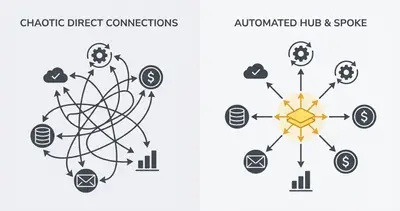
By building solutions inside a central hub like n8n from the start, your data never leaves your controlled environment. Your CRM, your custom workflows, and your team communication all share the same exact ecosystem.
For a deeper dive into choosing the right core platform, check out our building vs buying AI automation decision guide.
Real-World Scenarios: Making the Call
Let's apply the framework to common small business scenarios.
Scenario A: Client Support Ticketing
Your agency receives 50 support emails a day. Things are slipping through the cracks.
- Is it a core advantage? No. Standard ticketing is a commodity.
- TCO: Zendesk or Help Scout might cost $200/month. Building a robust ticketing system with email parsing, state management, and user interfaces in an automation tool is highly complex.
- The Verdict: BUY. Purchase a dedicated helpdesk tool. The built-in features for ticket merging, team collision detection, and SLA tracking are too valuable to reinvent.
Scenario B: Post-Webinar Lead Routing
You run a weekly webinar. You need to segment attendees based on watch time, check if they exist in your CRM, assign them to a specific rep based on geography, and send a customized follow-up sequence.
- Is it a core advantage? Yes. How you handle your proprietary leads directly impacts your closing rate.
- TCO: Niche webinar-follow-up software might charge high monthly fees and limit your routing options.
- The Verdict: BUILD. Use your automation hub. Pull the webinar data via API, run your exact custom logic, update your CRM, and trigger your email platform. You retain total control over the exact routing rules.
The Hybrid Approach: Buy the Core, Build the Edges
The most successful businesses do not exclusively build or exclusively buy. They use a hybrid approach.
They buy robust, foundational systems for their core databases. They buy Salesforce or HubSpot. They buy Xero or QuickBooks. They buy Google Workspace.
Then, they aggressively build the "edges."
They refuse to buy expensive, bolt-on SaaS tools for every minor workflow. Instead, they use platforms like n8n to build custom bridges between their core systems. They write custom logic that fits their specific business model. They create a lean, highly profitable technology stack that scales without multiplying costs.
Summary and Next Steps
SaaS bloat happens slowly. One $49 subscription at a time, your software stack becomes an unmanageable, expensive web. To stop the bleeding, rely on the framework:
- Identify the strategic value: Buy commodities, build competitive advantages.
- Calculate the 24-month TCO: Stop looking at monthly costs and evaluate the long-term impact of per-seat pricing vs. fixed automation costs.
- Leverage your existing hub: Maximize the value of platforms like n8n before paying for a new standalone tool.
Your goal isn't to eliminate all software. Your goal is to own the processes that make your business unique and rent the ones that don't.
Ready to audit your current software stack and replace expensive SaaS tools with streamlined automations? Book a demo with Evalics today. We will help you identify exactly which tools you can eliminate this week.
Related Resources
- Stop Paying for 10 Different SaaS Tools Build Them in n8n
- Building vs Buying AI Automation
- Hidden AI Automation Costs No One Warns You About
- 80 20 Rule Business Automation What to Automate First
Official Sources
- Gartner: Worldwide IT Spending and SaaS Growth Trends
- Harvard Business Review: The Hidden Costs of Software Bloat
- McKinsey: Developer Velocity and Automation Tools