
Make.com feels like magic on day one. You connect a CRM to Slack, automate onboarding emails, and sync invoicing software in an afternoon. It is fast, visual, and highly addictive.
The trouble starts when volume grows.
Client load triples. Workflows start doing AI lead enrichment, scraping hundreds of websites daily, and pushing large datasets between platforms. The monthly Make.com bill climbs faster than the work it supports, simple scenarios turn into tangled webs of routing logic, and a failed API call takes hours to trace.
That is the "Make.com Wall": the point where the platform that got you started begins to punish your margins.
Here is how Make.com and n8n actually differ, where each one wins, and how to decide whether a switch is worth it for your business.
The Honeymoon Phase: Why Make Is Great
Before the criticism, it is worth being clear about why Make.com is still a massive player in the automation space.
Make is the ultimate prototyping playground. Its visual, bubble-based interface makes it easy for non-technical founders to understand how data flows from point A to point B.
When a small team is testing a new business process, speed is everything. Make lets you drag, drop, and map data fields with zero coding experience. For low-volume tasks, like sending a Slack notification when a high-ticket invoice is paid, Make is flawless.
Key Insight: Make.com optimizes for time-to-first-value. You can build and deploy a working automation in 15 minutes. But optimizing for setup speed often creates technical debt later.
The Three Breaking Points
Agencies rarely outgrow Make.com overnight. It usually happens across three specific operational bottlenecks.
1. The "Per-Operation" Pricing Trap
This is the number one reason agencies outgrow Make.com.
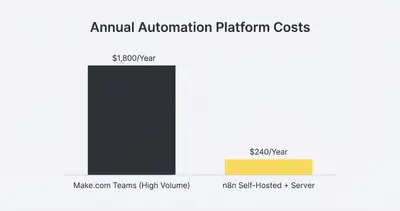
Make charges for every single operation (step) in a workflow. If your workflow has 5 modules, and you process 100 leads through it, you just burned 500 operations.
AI data enrichment makes that math brutal. A workflow that scrapes data, summarizes it with ChatGPT, updates HubSpot, adds rows to Google Sheets, and alerts the sales team can easily reach 15 or more steps. Multiply that by every lead processed each day and the operation count grows far faster than the value of the leads themselves.
In other words, the pricing model charges you more precisely when client acquisition is going well.
n8n fundamentally changes this math. On its cloud version, billing is per workflow execution, not per step. Self-hosted, your operations are effectively unlimited and you only pay for server hosting, usually around $10-20 a month.
2. The Router Nightmare (Spaghetti Logic)
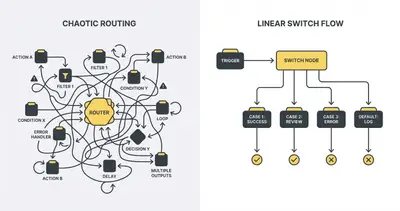
As business processes mature, they require conditional logic. "If the lead is a marketing agency, send them to Pipeline A. If they are an eCommerce brand, send them to Pipeline B. If the data is missing, send an email to the team."
Make.com handles this using "Routers."
The problem? Routers force you to visually duplicate your downstream steps. If all three pipelines eventually need to update the exact same Google Sheet, you have to place three identical Google Sheet modules at the end of every route.
When you need to change one column in that spreadsheet, you have to manually open and update all three modules. Miss one, and the automation breaks.
n8n solves this elegantly with the Switch node. It routes data without forcing you to duplicate the end of your workflow. There is more on that pattern in our guide on The Switch Node Secret How To Clean Up Your Messy Automations.
3. Error Handling and Vendor Lock-in
When an API goes down, automations fail. It is a fact of business.
Make's error handling is notoriously frustrating. If a module fails midway through processing a list of 50 items, the entire execution often halts. Finding the exact item that caused the crash means digging through cryptic logs.
You are also entirely reliant on Make's native integrations. If Make has not built an integration for a niche software your client uses, you are stuck writing messy HTTP requests.
Because Make is a closed-source SaaS, you do not own the underlying infrastructure. If pricing changes tomorrow, your only option is to pay.
Where n8n Pulls Ahead
n8n is not simply a cheaper Make.com. It is closer to automation infrastructure you own, and that shows up in three distinct advantages.
Deep Logic and Code Control
n8n caters to users who want to go deeper. While most of a workflow can be built using drag-and-drop nodes, n8n includes a native Code node that accepts standard JavaScript and Python.
When a legacy client database returns data in a bizarre format, you do not have to string together 10 different text-formatting modules. Three lines of JavaScript clean the data and the workflow moves on.
True Sub-Workflows
n8n supports sub-workflows seamlessly.
Instead of rebuilding a complex "Slack Error Alert" sequence inside every automation, you build it once as a standalone sub-workflow. Every other automation triggers that one master sub-workflow when it fails.
That modular approach is what keeps maintenance manageable as the number of workflows grows. For a deep dive into how to structure this, read our framework on N8n Workflow Design Patterns Error Handling Production Setup.
Better Margins via Self-Hosting
Agencies live and die by their margins. A self-hosted n8n instance on a private server removes the automation software bill entirely.
A small droplet costs roughly $20 a month and can process a very large volume of operations, run multiple AI agents, and handle client reporting.
Quick Win: If you are nervous about server management, you do not have to self-host immediately. n8n Cloud offers an execution-based pricing model that is still more margin-friendly than Make for high-volume users. Check out our breakdown on Self-Hosted n8n vs Cloud Which Protects Margins.
The Migration Reality Check
Switching is not a weekend project. Replacing core business infrastructure is painful.
Make.com processes data in distinct "bundles." n8n processes data in JSON arrays. Because the underlying data structures are fundamentally different, there is no magic "export to n8n" button. Every workflow has to be rebuilt from scratch.
Reality Check: Do not migrate your entire business at once. Plan for weeks of dedicated effort, not days, and expect workflows to break during the transition.
A sane migration sequence looks like this:
- The Automation Audit: List every active Make.com scenario. Delete the ones that are outdated or no longer tied to core business goals before you rebuild anything.
- The Stranglehold Approach: Leave existing workflows running on Make. Build every new workflow natively in n8n.
- The High-Cost Cutover: Identify the handful of workflows consuming most of your Make.com operations. Rebuild and test those in n8n first, because that is where the bill actually drops.
- The Long Tail: Migrate the remaining low-volume tasks one by one, until cancelling the Make subscription is a non-event.
The Decision Framework: Should You Switch?
n8n is the stronger platform at scale. It is not the right answer for everyone. Here is how to decide your next move.
Stay on Make.com if:
- You are a solo founder validating a new business idea.
- Your automations are simple, linear point-A-to-point-B tasks.
- Your monthly operation count is comfortably under 10,000.
- You do not have an in-house technical team or the budget to hire an automation specialist.
Migrate to n8n if:
- Your Make.com bill exceeds $100/month and is climbing.
- Your workflows process thousands of database rows or API calls daily.
- You need complex routing without duplicating workflow steps.
- You require strict data privacy and need to self-host your infrastructure on your own servers.
- You want to run heavy, multi-step AI agent workflows without going broke.
Final Thoughts
Make.com teaches you how to automate. n8n lets you build actual software infrastructure.
When you are small, you pay for convenience. Make.com is an excellent sandbox for learning the fundamentals of connecting APIs and freeing up your time. But as a business matures, its software stack needs to mature with it.
Moving away from per-operation pricing changes the question you ask. You stop asking, "How much will this cost to run?" and start asking, "What else can we automate today?"
If your agency is hitting the Make.com wall and you are tired of untangling spaghetti workflows, it is time to upgrade your tech stack.
Ready to scale your business operations without scaling your software costs? Book a demo with Evalics today and let us build a custom, scalable n8n architecture for your agency.
Related Resources
- N8n vs Make Why Small Businesses Are Switching 2025
- The Switch Node Secret How To Clean Up Your Messy Automations
- N8n Workflow Design Patterns Error Handling Production Setup
- Stop Paying For 10 Different SaaS Tools Build Them In n8n
Official Sources
- Make.com Official Pricing & Operations Guide
- n8n Cloud Pricing vs Self-Hosted Documentation
- n8n Core Nodes and Switch Logic Details
By Kevin Michael Schindler, AI Automation Expert at Evalics