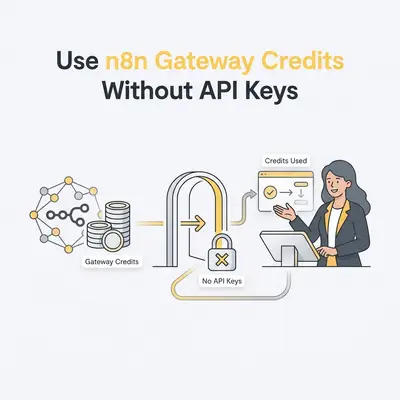
n8n Gateway credits let you run supported AI models and tools in n8n without creating a single provider account or API key. Setting up individual third-party API keys for every new tool or AI model creates major friction when building automations. Gateway credits eliminate this setup bottleneck by providing a single shared, prepaid balance on n8n Cloud that powers supported models and tools instantly. This allows small business teams to test, iterate, and deploy AI workflows without spending hours creating vendor accounts or managing fragmented API keys.
What Are n8n Gateway Credits?
Gateway credits are a prepaid balance built into n8n Cloud Starter and Pro plans, available from n8n 2.36.0. They are not available on n8n Cloud Enterprise or self-hosted n8n, and free trials include credits but cannot top up until you upgrade. Instead of creating accounts, adding credit cards, and generating API keys across half a dozen external vendor websites, you select Gateway credits inside your node settings.
n8n routes each request through its own gateway, under n8n's provider accounts, and bills usage per request at the rates listed on its service pricing page. Rates vary by model and service and change over time, so check that page before estimating costs. Each Cloud instance has one shared balance, and the Gateway credits page in the n8n Cloud console shows the balance and your spend over time.
Key Insight: Gateway credits act as a universal power adapter for AI automation. You pay one bill directly to n8n while accessing multiple third-party model and tool providers instantly.
Which Models and Tools Are Supported at Launch?
The Gateway credits feature launches with support for six leading AI model providers and five dedicated web, document, and scraping tools:
- Model Providers: Anthropic, Google Gemini, OpenAI, Alibaba Cloud (Qwen Cloud Node), Kimi.ai, and MiniMax.
- Tool Services: Brave Search, Browserbase, Firecrawl, LlamaParse, and PDF.co.
How Do You Use n8n Gateway Credits Without API Keys?
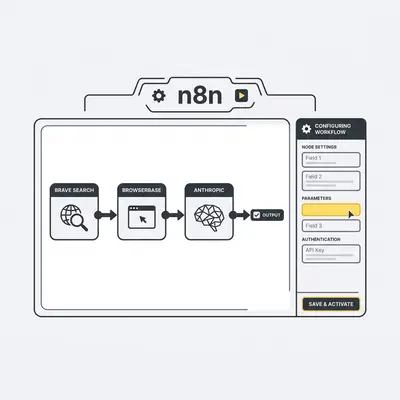
To start using n8n Gateway credits, you select the Gateway option inside your node configuration rather than entering external API credentials. This routes your request through n8n's unified prepaid balance, allowing you to run complex workflows immediately without leaving the canvas to sign up for provider accounts.
- Log in to your n8n Cloud Starter or Pro instance and open a new or existing workflow canvas.
- Add a supported node such as Anthropic, OpenAI, Google Gemini, Brave Search, or Firecrawl to your workspace.
- Select "Use Gateway credits" in the node's credential field instead of selecting custom API credentials. The option shows your remaining balance.
- Configure your node parameters like user prompts, targets, URLs, or file extraction settings.
- Execute the node or workflow to test execution using your shared instance balance.
- Monitor your balance and spend on the Gateway credits page in the n8n Cloud console.
How Do You Build a Web Research Automation Using Gateway Credits?
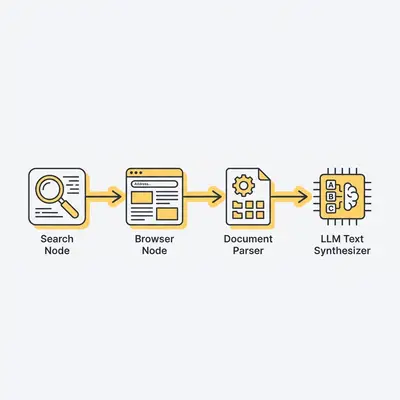
Building an automated competitive intelligence or web research workflow with Gateway credits requires zero separate account setups for search, browsing, or AI parsing. You can connect live web search, headless web scraping, and document extraction directly inside the n8n editor in just a few clicks.
Setting Up Live Web Search with Brave Search
Traditional web research workflows break when search APIs require complex developer account verification or monthly subscription tiers. Using the Brave Search node with Gateway credits routes queries through Brave's independent index without extra account steps.
Inside the node properties, configure the query parameter to target live company news or product updates:
{
  "query": "site:example.com/changelog OR \"product update\"",
  "count": 5,
  "result_filter": "discussions,news"
}
This retrieves current web pages, structural search results, and fresh links that can feed directly downstream into data collection stages.
Extracting Dynamic Web Data via Browserbase
Static web scrapers fail when pricing tables or feature lists render dynamically using client-side JavaScript. Adding the Browserbase node via Gateway credits spins up a cloud-hosted headless browser that interacts with modern websites.
Configure the node to open specific URLs discovered by search, click dynamic toggles, wait for DOM hydration, and return rendered HTML or extracted text directly into your workflow.
Parsing Complex Documents with LlamaParse
When web research turns up PDF whitepapers, financial filings, or technical briefs, standard text extractors collapse complex table structures into unreadable streams. LlamaParse uses vision-language models to extract structured layout data while preserving tables and formatting.
Passing PDF files into the LlamaParse node with Gateway credits converts messy enterprise documents into structured Markdown, giving downstream AI models clean data to process.
How Do You Synthesize Research and Generate Reports with AI Models?
Once raw data is collected from search nodes and web scrapers, you can feed it directly into leading AI language models using the same shared credit balance. Choosing the right model for the job—whether for deep research, code execution, or summary generation—ensures cost-efficient and high-quality outputs.
Choosing Between OpenAI, Anthropic, and Google Gemini
- Anthropic (Claude): Ideal for complex reasoning, long document synthesis, and nuanced editorial generation.
- Google Gemini: Best for fast multi-modal context processing, rapid web analysis, and large context windows.
- OpenAI: Powerful for structured JSON outputs, strict instruction adherence, and tool-use operations.
Utilizing Open-Source Models Like Alibaba Qwen and Kimi.ai
For multi-step research and long-horizon tasks, open-weights model providers offer highly capable alternatives available directly through Gateway credits:
- Alibaba Cloud (Qwen): Optimized for complex multi-step technical logic, enterprise research, and code-heavy agent execution.
- Kimi.ai: Specialized for long-context research workflows that require tracking context across long sequences.
- MiniMax: Built for large-scale context processing and multi-modal generation tasks.
Pro Tip: Switch model nodes within an n8n workflow simply by changing the credential dropdown to Gateway credits. You can benchmark Anthropic, Gemini, and Qwen side-by-side on identical prompts without signing up for separate developer accounts.
What Common Pitfalls Should You Avoid When Using Gateway Credits?
While Gateway credits make automation testing seamless, failing to monitor shared usage or understanding data privacy parameters can lead to unexpected credit depletion or governance issues. Being proactive about workflow monitoring ensures smooth operations across your team.
Tracking Shared Usage Across Team Members
Because Gateway credits rely on a single shared prepaid balance on your n8n Cloud instance, unmonitored production loops or infinite retry setups can exhaust funds for all workspace users.
Nodes using Gateway credits fail when the instance balance reaches zero. The instance owner should review the Gateway credits page in the n8n Cloud console regularly and can set up auto top-up to prevent interruptions. The balance is not broken down by workflow, so add error notifications to catch runaway loops early.
Understanding Data Privacy and Content Handling
When executing nodes using Gateway credits, n8n sends requests through its own gateway under its own provider accounts.
The external model or tool provider receives the full request payload—such as prompts, uploaded text, or scraped documents—to fulfill the execution. However, providers do not receive your identity or n8n account details.
Transitioning to Direct Provider API Keys When Scaling
Gateway credits simplify initial workflow builds and low-volume operations. If your automation scales up to millions of executions monthly, transitioning to direct provider API keys may offer advantages such as enterprise volume discounts or custom rate limits.
Reality Check: Gateway credits are designed to accelerate building and testing. You can swap any node from Gateway credits to your own direct API key at any time without rebuilding your workflow logic.
How Do Gateway Credits Compare to Direct Provider Credentials?
Using Gateway credits provides immediate accessibility and simplified billing, whereas direct provider keys offer long-term direct vendor relationships. Small businesses should weigh the convenience of a single invoice against their long-term infrastructure strategy.
- Gateway Credits: Zero initial setup, no third-party account creation, single prepaid balance managed in n8n, per-request rates published on n8n's service pricing page.
- Direct Provider Keys: Requires separate vendor signups, individual API key management, enterprise rate negotiate options, custom usage quotas managed per platform.
What Is the Checklist for Launching Your First Gateway Credit Workflow?
Before publishing your n8n workflow to production using Gateway credits, review this checklist to ensure proper budget allocation, node configuration, and operational oversight.
- Confirm your instance is on n8n Cloud Starter or Pro (n8n 2.36.0 or later) with an active credit balance
- Verify that all selected nodes support Gateway credits
- Ensure "Gateway credits" is selected in the credential field for every supported node
- Test individual nodes to verify outputs before running the full workflow
- Check the Gateway credits page in the n8n Cloud console to confirm expected spend
- Set up workflow error notifications to avoid run loops that consume balance
To streamline your automation build further, explore our guide on n8n vs Make vs Zapier in 2026 to select the right platform structure, or read our breakdown on n8n AI agent node error handling for building reliable agents.
Sources
- Gateway credits - n8n Docs
- Use Gateway credits - n8n Docs