You spend your weekends catching up on invoices. Your inbox is an unorganized nightmare. You copy data from an email, paste it into your CRM, and then manually draft a calendar invite.
You started a business for freedom and scale. Instead, you built yourself a high-stress data-entry job.
Research from organizations like Asana shows that knowledge workers spend up to 58% of their day on "work about work." For founders, this administrative burden is toxic. Every hour you spend sorting emails is an hour you aren't closing deals, improving your product, or stepping away to recharge.
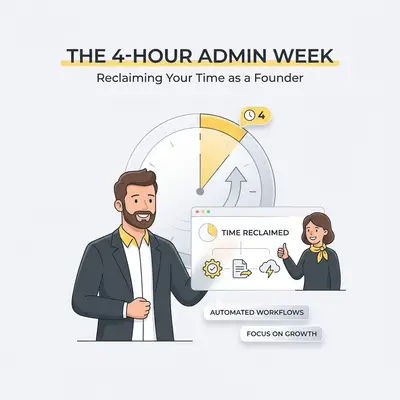
You cannot scale a business if you are the bottleneck for every admin task. It is time to implement the 4-Hour Admin Week.
This framework strips your administrative burden down to just four hours of batched, focused work per week. The rest gets handled by AI and automation platforms. Here is how you build it.
The Admin Time Trap
Most founders dramatically underestimate the time they lose to micro-tasks. A five-minute task repeated ten times a day costs you over four hours a week. Add context switching, and the real cost is closer to a full workday.
If you currently spend 20 hours a week on administrative tasks, you are burning over 1,000 hours a year.
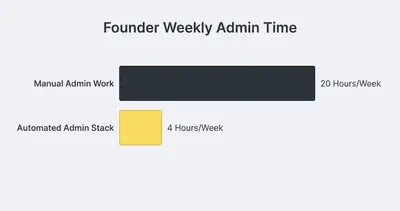
Getting this down to four hours requires a ruthless approach to your daily operations. You must move from being a "doer" of tasks to a "manager" of systems.
Key Insight: Founders do not scale by typing faster. They scale by removing themselves from the execution loop of repetitive work.
Step 1: Audit and Eliminate
Before you automate anything, you must eliminate the garbage. Automating a useless task just means you are doing something pointless faster.
Track every task you do for three days. Write it down. Then, run each task through a simple filter.
- Does this task actually drive revenue or operations? (If no, stop doing it).
- Does this task require my specific human empathy or strategic thinking? (If no, it is a candidate for automation).
If a task is repetitive, logic-based, and happens on a computer, it belongs to an AI agent or a workflow rule. Try using the 5-minute test to see if your business process can be automated to quickly filter your list.
Step 2: Automate the "Big Three" Time Sinks
For most founders, 80% of admin time is consumed by just three categories: Inbox management, client onboarding, and data entry. Fix these, and you instantly reclaim days of your life.
1. The Automated Inbox Triage
Your inbox is a to-do list created by other people. You should not read every email that comes in.
Instead of manually sorting emails, build a workflow in a tool like n8n or Make.com to triage them for you.
- The Trigger: A new email arrives in Gmail or Outlook.
- The Brain: The workflow sends the email content to an AI model (like Claude 3.5 Sonnet or GPT-4o).
- The Action: The AI categorizes the email. Is it a sales lead? A support ticket? A newsletter?
- The Result: The workflow automatically drafts a polite response for support tickets, adds leads to your CRM, and moves newsletters to a "Read Later" folder.
You only log in to approve drafts or reply to VIPs. This alone can save you massive amounts of time. Read our full guide on how to automate your inbox and reclaim 10 hours a week.
2. Zero-Touch Client Onboarding
Manual onboarding kills momentum. A client pays an invoice, and then they wait hours (or days) for you to manually send a welcome packet, grant access to portals, and set up a Slack channel.
Automate the entire sequence.
When a payment succeeds in Stripe:
- Your automation tool catches the webhook.
- It generates a personalized welcome PDF.
- It creates a Google Drive folder for the client.
- It adds them to your project management tool.
- It sends an enthusiastic welcome email with their next steps.
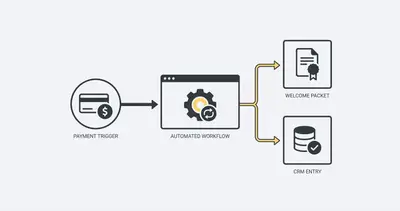
The client gets instant gratification. You get zero extra work. If you want to see this exact build, check out our walkthrough on automating client onboarding from paid invoice to welcome packet.
3. Cross-Platform Data Syncing
Stop acting as the bridge between your software tools. If you are copying a lead from Facebook Ads into HubSpot, and then into a Google Sheet, you are wasting time.
Connect your apps directly. Use tools like Make.com or n8n to ensure that when data updates in one place, it updates everywhere.
Pro Tip: If you are paying for expensive tools just because they have "native integrations," you can usually cancel those premium tiers. You can stop paying for 10 different SaaS tools and build them in n8n instead.
Ready to stop doing manual admin? Let us help you build a system that works while you sleep. Book a demo with Evalics to map out your 4-Hour Admin Week.
Step 3: Use AI Agents as Your Digital VA
Traditional automation (like Zapier) relies on strict "If X, then Y" rules. If an email subject line doesn't match perfectly, the automation breaks.
Modern AI agents solve this. They handle unstructured data.
You can set up an AI agent to monitor a generic support inbox. When a client emails, "Hey, can I get a copy of my last invoice?", the agent reads the intent, searches your billing software via API, generates the PDF, and drafts the reply for your approval.
The agent handles the fuzzy logic that previously required a human Virtual Assistant. You get the benefit of human-like comprehension at the speed and cost of software.
Reality Check: AI agents are not perfect yet. They will occasionally hallucinate or make bad calls. Always configure your workflows to draft responses for your review rather than sending them automatically, especially for external communications.
Step 4: Batching the Final 4 Hours
You will never automate 100% of your admin work. Some tasks require a human touch: reviewing complex proposals, signing legal documents, or making nuanced financial decisions.
The goal is to compress these remaining tasks into strict time blocks. This is how you enforce the 4-hour rule.
Schedule Two Admin Blocks Per Week
Do not do admin work constantly throughout the day. Turn off your notifications.
Schedule two 2-hour blocks per week on your calendar (e.g., Tuesday and Thursday afternoons). During these blocks, you:
- Review and approve AI-drafted emails.
- Process complex invoices.
- Review workflow error logs.
- Handle escalations that your automated systems flagged.
Outside of those four hours, you do not touch admin. If a non-urgent task arises, drop it into a designated holding folder and ignore it until your next block.
The Tools You Need
You do not need an enterprise budget to build this stack. A modern, automated admin system relies on a few inexpensive core tools:
- Workflow Engine: n8n (for flexibility and deep logic) or Make.com (for visual simplicity). Avoid Zapier if you want to scale—it gets too expensive.
- AI Brain: OpenAI (GPT-4o) or Anthropic (Claude 3.5 Sonnet) connected via API.
- Core Workspace: Google Workspace or Microsoft 365.
- Data Hub: Airtable or structured Google Sheets.
With just these tools, you can automate thousands of tasks per month for under $50.
Conclusion
Your time is the most valuable asset your business has. Every hour spent doing manual administrative work is an hour stolen from strategy, sales, and product development.
By auditing your tasks, automating the "Big Three" time sinks, leveraging AI agents for unstructured data, and rigidly batching what is left, you can compress your administrative burden into just four hours a week.
Stop working for your business systems. Make them work for you.
Ready to reclaim your week? Book a demo with Evalics and let's build your automated workflow engine.
By Kevin Michael Schindler, AI Automation Expert at Evalics
Related Resources
- The 5 Step System to Automate Your Inbox and Reclaim 10 Hours a Week
- Automating Client Onboarding Paid Invoice to Welcome Packet
- The 5 Minute Test to See If Your Business Process Can Be Automated
- Stop Paying for 10 Different SaaS Tools Build Them in n8n