
You read the first sentence and instantly know.
"In today's fast-paced digital landscape, businesses must leverage robust solutions to unlock synergies."
You roll your eyes and close the tab. Your potential customers do the exact same thing when they land on your AI-generated blog posts.
Everyone is using AI to write content. But 90% of it is unreadable. It is full of fluff. It uses words nobody says in real life. It lacks an actual opinion.
If your business relies on content marketing, publishing raw ChatGPT output is actively harming your brand. Readers crave authenticity. When they spot a robot, they lose trust.
You do not need to abandon AI. You just need to stop letting it drive without a map. Here is exactly why your AI content sounds fake, and the three prompts you need to fix it today.
Why AI Defaults to "Corporate Robot" Mode
AI models like ChatGPT, Claude, and Gemini are not trying to bore you. They are mathematically designed to be average.
Large Language Models (LLMs) predict the most likely next word based on their training data. Because they were trained on the entire internet—including millions of dry academic papers and generic corporate press releases—their baseline tone is highly formal.
Furthermore, models go through RLHF (Reinforcement Learning from Human Feedback). Human testers train the AI to be helpful, polite, and safe.
Reality Check: "Safe and polite" translates to "boring and passive" in marketing. AI wants to please everyone. Therefore, it offends no one and inspires no one.
If you just type, "Write a blog post about AI automation," the model will give you the most average, predictable response possible.
To get great content, you must force the AI out of its comfort zone. You do this through constraints.
The "Fake Content" Red Flags
Before fixing the problem, you need to recognize it. If your content includes these elements, readers will instantly flag it as AI:
- The Forbidden Vocabulary: Delve, leverage, tapestry, robust, testament, multifaceted, crucial, dynamic, landscape, unlock.
- The "In Summary" Conclusion: AI loves to wrap up every thought with a neat, repetitive summary.
- The Neutral Fence-Sitting: AI hates taking a firm stance. It will always say "On one hand X, but on the other hand Y."
- The Wall of Text: AI defaults to long, dense paragraphs of uniform length.
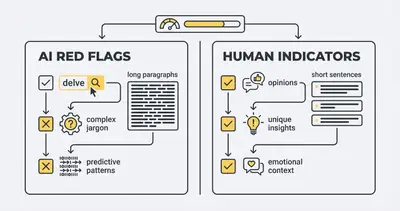
To eliminate these red flags, you need a system. Let's look at the three prompts that change everything.
Prompt 1: The "Anti-Fluff" Constraint
AI does not know what good writing is. You have to define it.
The most effective way to improve AI writing is through negative constraints. Instead of telling the AI what to do, tell it exactly what it is forbidden to do.
This prompt strips out the corporate jargon and forces the model to use simple, direct English.
The Prompt:
You are an expert copywriter. Write a draft about [Topic].
You must strictly obey these negative constraints:
- NEVER use the words: delve, leverage, robust, unlock, tapestry, testament, crucial, landscape, synergy, or dynamic.
- NEVER start a conclusion with "In conclusion," "To summarize," or "Ultimately."
- NEVER write sentences longer than 20 words.
- NEVER use passive voice.
- DO NOT use corporate jargon or fluff.

Write at an 8th-grade reading level. Use simple, punchy, everyday English. If you can delete a word without changing the meaning of the sentence, delete it.
Quick Win: Put this prompt into your Custom Instructions (in ChatGPT) or a Project (in Claude). You will never have to read the word "delve" again. For a deeper dive into controlling AI behavior, read our guide on how to use AI to write blogs that don't sound like a robot.
Prompt 2: The "Point of View" Injector
Content without an opinion is just a Wikipedia article. AI models are trained to be completely objective. They will summarize a topic, but they will rarely tell the reader what to do based on experience.
To make content sound human, it needs a Point of View (POV). You must feed the AI a specific angle, a contrarian take, or a framework.
The Prompt:
Write an article about [Topic]. Do not just summarize facts. You must write from this specific Point of View:
- Angle: Most people believe [Common Belief], but they are wrong. The truth is [Your Contrarian Take].
- Tone: Authoritative, direct, and slightly conversational. Like an expert giving advice to a friend over coffee.
- Framework: Structure the argument around the "Rule of 3" [or your specific framework].
- Required Element: Include a section where you push back against a common industry myth.

Do not be completely neutral. Take a firm stance on [Specific Argument].
Why this works: When you force the AI to argue a specific point, it stops writing generic summaries. It starts building a logical case. This mimics human expertise. If you want to refine this process further, check out our prompt engineering step-by-step checklist.
Prompt 3: The "Formatting & Pacing" Director
Human writers vary their pacing. They use short sentences for impact. They use bullet points for scannability. They use bold text for emphasis.
AI defaults to monotonous, repetitive paragraph structures. You have to act as the creative director and explicitly mandate how the text should look on the page.
The Prompt:
Format the output for maximum scannability and web reading. You must follow these formatting rules:
1. Paragraph Length: No paragraph can be longer than 3 sentences.
2. Sentence Variety: Mix short sentences (5 words) with medium sentences (15 words). Use short sentences for emphasis.
3. Callouts: Include 2 distinct callout blocks starting with "> **Pro Tip:**" or "> **Reality Check:**".
4. Lists: Use bullet points when listing 3 or more items.
5. Bold Text: Bold the most important concept in each section.

Do not use traditional essay structure. Start immediately with a hook. No introductory throat-clearing.
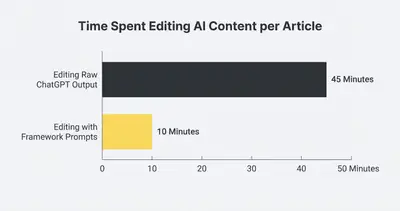
How to Stack the Prompts for Production
Using these prompts individually helps, but stacking them creates a foolproof content engine.
Instead of typing these out every time, combine them into one master System Prompt.
The system prompt acts as the brain for your AI session. It sets the unbreakable rules before you even ask it to write a specific article. (If you aren't sure how this works, read our breakdown on system prompt vs user prompt AI behavior).
Here is how you execute this in your workflow:
- Open a new chat (or create a Custom GPT / Claude Project).
- Paste the combined master prompt in the system instructions. This includes the Anti-Fluff rules, the Tone guidelines, and the Formatting director.
- Provide your specific outline. Never let the AI guess your outline. Give it the exact H2s you want covered.
- Add your unique data. Feed the AI a messy voice memo, a few bullet points of your personal experience, or an internal company document.
The AI will take your raw human insights and format them using the strict writing constraints.
Pro Tip: Do not generate an entire 1,500-word article in one click. Ask the AI to generate the article section by section. This prevents the model from rushing the end of the post and abandoning your constraints.
Editing is Still Required
Even with the perfect prompt, AI is not a set-it-and-forget-it tool for content marketing. You are the editor-in-chief.
You should still run the final output through tools like the Hemingway App to ensure it meets readability standards. Read the content out loud. If you stumble over a sentence, rewrite it.
Google's helpful content guidelines clearly state that content must be created for people, by people. AI is a fantastic drafting assistant, but the final polish must come from human eyes.
Stop accepting mediocre AI content. Use negative constraints to kill the fluff. Inject a point of view to add expertise. Control the formatting to keep readers engaged.
When you treat AI like a junior copywriter that needs strict boundaries, your content will finally sound like you again.
Related Resources
- How to Use AI to Write Blogs That Don't Sound Like a Robot
- The 3 Prompt Framework to Automate Your Entire Content Calendar
- Prompt Engineering Step by Step Checklist
- System Prompt vs User Prompt AI Behavior
Official Sources
- Google Search Central: Creating Helpful, Reliable, People-First Content
- OpenAI: Best Practices for Prompt Engineering
- Hemingway Editor: Tool for Bold, Clear Writing
Ready to scale your content engine without sounding like a robot? Book a demo with Evalics today to see how we build custom AI writing workflows for businesses.
By Kevin Michael Schindler, AI Automation Expert at Evalics