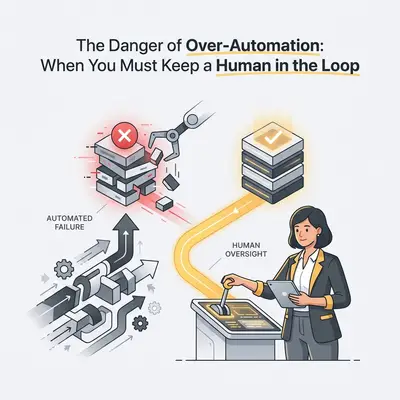
Your customer just sent a furious email about a billing error that overcharged them by $5,000. They are stressed, frustrated, and threatening to cancel their contract.
Three seconds later, your fully automated AI agent replies: "Hi there! I hope you are having a wonderful day. I see you have a question about billing. Have you tried checking our FAQ page?"
Congratulations. You just lost a $50,000 account to save three minutes of manual typing.
The internet is flooded with advice telling you to automate everything. Gurus promise that you can hook up an AI agent to your inbox, CRM, and customer support, allowing you to sit on a beach while the business runs itself.
This is a dangerous myth.
While AI is incredible at processing data and executing repetitive logic, it lacks empathy, nuance, and common sense. When you over-automate the wrong parts of your business, you don't scale efficiency—you scale liability.
Here is the truth about building business workflows that actually survive in the real world: the most profitable automations do not replace humans. They tee up the work so humans can perform at their peak.
This approach is called "Human-in-the-Loop" (HITL). Here is exactly when you need it, and how to implement it before an unmonitored AI costs you your reputation.
The Over-Automation Trap
Business owners usually fall into the over-automation trap during the "honeymoon phase" of AI.
You build your first workflow. It saves you ten hours a week. The dopamine hits. Suddenly, you look at every single process in your company and think, "I can automate that."
But automation is a multiplier. If your process is flawless, automation scales your success. If an AI model hallucinates or misinterprets a prompt, automation scales that error instantly across hundreds of touchpoints.
Reality Check: An AI model does not know if it is drafting a harmless tweet or sending a legally binding contract addendum to your biggest vendor. It just predicts the next logical word.
When you remove the human completely, you lose the safety net. You lose the gut check that says, "Wait, this client has been with us for five years, we shouldn't send them the standard late-fee template."
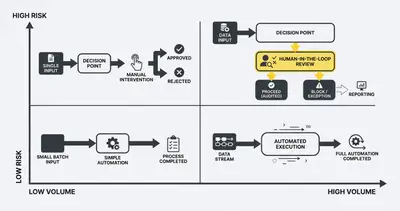
The Decision Framework: When to Automate vs. Intervene
How do you decide what runs on autopilot and what requires human eyes? Look at two factors: Risk and Volume.
1. Low Risk, High Volume (Full Autopilot)
These are your administrative chores. Data moving from one system to another.
- Examples: Syncing new Stripe customers to your CRM. Formatting lead data. Sorting incoming emails by urgency.
- Action: Automate these 100%. If the automation fails, the worst-case scenario is a minor data cleanup.
2. Low Risk, Low Volume (Don't Automate)
These are rare, simple tasks.
- Examples: Ordering the team lunch once a month. Updating your personal Wi-Fi password.
- Action: Just do it manually. Building an automation takes longer than the lifetime time savings.
3. High Risk, Low Volume (100% Human)
These are strategic, high-stakes decisions.
- Examples: Firing an underperforming vendor. Pivoting your marketing strategy. Handling a PR crisis.
- Action: Keep AI out of the driver's seat entirely. You can use it as a brainstorming tool, but the execution must be deeply human.
4. High Risk, High Volume (Human-in-the-Loop)
This is the golden zone for modern agencies and small businesses. These tasks take up a massive amount of time, but the cost of getting them wrong is severe.
- Examples: Sending personalized cold outreach. Responding to complex customer complaints. Generating weekly client reports.
- Action: AI does 90% of the work (researching, formatting, drafting). A human does the final 10% (reviewing, tweaking, approving).
4 Critical Areas You Must Never Fully Automate
If you are currently running full automation on any of these four areas, you are playing Russian roulette with your business.
1. Empathy-Driven Customer Escalations
Basic support is fine to automate. "Where is my order?" or "How do I reset my password?" are perfect use cases for an AI chatbot.
But when a customer is angry, confused, or dealing with an edge case, a bot will only infuriate them further. AI agents are notoriously bad at handling overlapping, emotional complaints. They stick to their system prompts and fail to read the room. Route these tickets to a human immediately.
2. High-Ticket B2B Sales
AI is incredible at lead generation. It can scrape LinkedIn, score prospects, and enrich CRM profiles.
But closing a $10,000+ B2B deal requires trust. It requires reading hesitation in a prospect's email. It requires knowing when to push and when to back off. If an AI agent sends aggressive follow-ups to a CEO who just mentioned a family emergency, that bridge is burned forever.
3. Final QA on Deliverables
If you run an agency, AI can write your code, draft your blogs, or generate your ad copy. But it cannot be the final set of eyes before the client sees the work.
AI models hallucinate. They invent statistics. They write code that looks perfect but contains subtle security flaws. A human must always review the final output. You are selling your expertise and quality control, not just raw output.
4. Financial Actions
Never give an AI unmonitored access to spend your money or issue refunds. Without strict limits, an AI customer service agent might issue a $1,000 refund because a user cleverly prompted it to do so. Automation should flag the refund request; a human should press the button to execute it.
Key Insight: In our experience auditing over 100 business workflows, the companies that scale successfully use AI as an exoskeleton, not a replacement. AI gives your team super-strength, but your team still directs the punches.
The Real Cost of Over-Automation
Let’s look at the financial impact of removing humans too early.
Imagine a SaaS company dealing with 100 escalated support tickets per month. They can choose three paths: Fully Human, Fully Automated, or Human-in-the-Loop.
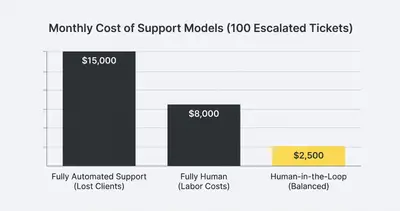
If they use humans for everything, labor costs are high. If they use unmonitored AI, the operational cost drops to near zero, but the churn rate skyrockets because angry customers cancel their subscriptions. The Human-in-the-Loop model achieves the optimal balance. The AI drafts the complex replies instantly, and a human agent reviews them in seconds. You get the speed of AI with the retention rate of human empathy.
How to Build Human-in-the-Loop Workflows
Implementing a safety net doesn't mean printing out papers and signing them. You can build seamless approval processes directly into your automation platforms like n8n or Make.com.
Here are the three best ways to keep a human in the loop without slowing down your operations.
1. The "Draft, Don't Send" Method
This is the easiest way to start. Instead of configuring your workflow to send an email, configure it to create a draft.
If you automate a weekly report for a client, have n8n pull the analytics, format the data, and write the executive summary. Then, use the Gmail integration to Create Draft.
Every Friday morning, your account manager opens their inbox, reviews five pre-written client emails, makes minor tweaks, and hits send. You save 4 hours of report building, but keep 100% control over client communication.
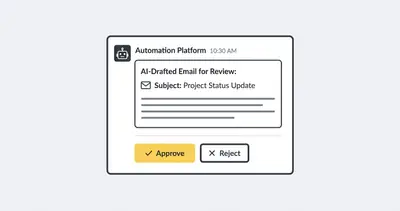
2. Slack / Teams Approval Buttons
Advanced workflow tools like n8n allow you to pause an automation mid-execution and wait for a webhook response.
You can build a flow that sends a message to a specific Slack channel: "New lead qualified. AI drafted this custom outreach email. [Read Draft]."
Below the message, you place two interactive buttons: Approve or Reject.
- If you click Approve, the workflow resumes and sends the email.
- If you click Reject, the workflow ends, or alerts a human to rewrite it.
3. Confidence Threshold Routing
You can instruct AI models to grade their own confidence in an answer.
If a customer asks a question, the AI searches your knowledge base. You can prompt the AI: "If you are 100% certain of the answer based ONLY on the provided documents, answer the user. If you are less than 95% certain, output 'ESCALATE'."
Your automation platform then uses a Switch node. If the output is 'ESCALATE', it routes the ticket to a human's inbox. If it's a confident answer, it replies automatically.
Pro Tip: Always test your confidence thresholds heavily. Different models (like Claude vs. GPT-4) measure certainty differently. Start your threshold high (98%+) and lower it slowly as you monitor the results.
Scenario: Automated Media Outreach Without a Human Gate
Picture a PR agency automating its media outreach. AI scrapes recent articles, identifies journalists, and writes personalized pitch emails linking the agency's clients to each journalist's recent beat.
Run on full autopilot, it looks like it works. High volume, personalized, cheap.
Then a journalist writes a heartbreaking article about a local tragedy. The AI reads the article, notes the high engagement, and emails the journalist: "Loved your recent coverage on [Tragedy]. I have a B2B software client that would be a perfect fit for a follow-up piece!"
That email is one screenshot away from being the thing your agency is known for. The model has no concept of what the article is about, only that it performed well.
The fix is not to abandon AI. It is a human-in-the-loop model: the AI still generates every pitch, but it writes them into a Google Sheet instead of sending them. Someone spends a short window each day scanning the sheet, deleting the inappropriate ones, tweaking the good ones, and triggering the send.
You give up a small amount of throughput, because a few pitches get killed in review. What you buy is that the tone-deaf one never leaves the building.
Summary and Next Steps
Automation is a tool to eliminate drudgery, not a substitute for human judgment. When you rely blindly on AI to handle sensitive, high-stakes interactions, you are risking your business to save pennies.
Key Takeaways:
- Map your risk. Use the risk-versus-volume matrix to identify which processes require human oversight.
- Draft, never send. For external communications, let AI do the heavy lifting of researching and drafting, but force a human to click the final send button.
- Build approval gates. Integrate Slack or Teams approvals into your workflow tools so reviewing AI output becomes a frictionless, one-click process.
Stop trying to remove your team from the equation. Instead, use AI to remove the boring parts of their jobs so they can focus entirely on high-value, relationship-driven work.
Ready to build automations that scale without sacrificing quality? Book a demo with Evalics today. We will help you identify exactly where AI belongs in your business—and exactly where it doesn't.
Related Resources
- Why Automating Everything Ruins Customer Experience
- The 90 Percent AI Failure Rate How to Build Workflows That Survive
- Why Your First AI Automation Will Fail and How to Prevent It
- AI Sales Automation vs Manual Sales Processes Which Is Better
Official Sources
- Gartner: Why Human-in-the-Loop is Essential for AI Success
- McKinsey: The Economic Potential of Generative AI
- HubSpot: State of AI in Customer Service 2025
- n8n Official Documentation: Adding Human Approvals to Workflows
By Kevin Michael Schindler, AI Automation Expert at Evalics