You finally automated your customer support inbox. It works flawlessly for a week. You save hours every day.
Then, a furious client emails your personal address. Your AI agent just offered them a 100% refund and a free year of service. Why? Because the customer complained about a minor typo on your website, and the AI's system prompt told it to "prioritize customer satisfaction."
This is the danger of unsupervised AI.
Business owners often treat AI agents like highly experienced employees. They hand over the keys and walk away. But AI models do not have common sense. They do not understand the value of a dollar. They cannot read a room.
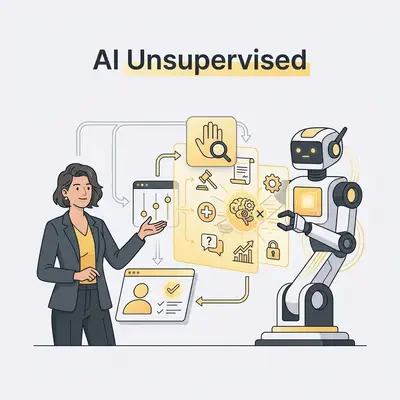
When you build automations, you must implement "human-in-the-loop" (HITL) checkpoints. The AI does the heavy lifting. A human makes the final decision.
If you want to protect your margins and your reputation, here are seven business tasks you should never trust an AI to do entirely on its own. (AI browser automation tools)
1. Final Financial Approvals and Payments
Never let an AI move money without a human clicking "Approve."
AI models are incredible at extracting data from invoices. They can categorize expenses, match receipts to bank feeds, and even draft the payment transfer. But they can also confidently misread a messy $100.00 invoice as $10,000.
If your workflow automatically pays that vendor, you are now fighting to get your money back.
Set up your workflows to pause before the final step. Have the AI send a summary to your Slack channel or email. Include the original invoice, the extracted amount, and an "Approve" button.
Quick Win: Set a strict financial threshold. Let AI automatically approve and process refunds or expenses under $20. Require human approval for anything above that limit.
2. High-Stakes Customer Escalations
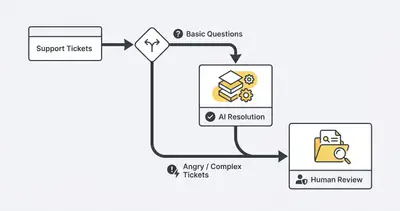
AI is perfect for answering tier-one support questions. It can track orders, reset passwords, and explain basic policies.
It fails miserably at empathy.
When a customer is angry, frustrated, or dealing with a sensitive issue, an AI response often makes it worse. AI tends to sound overly polite, robotic, and dismissive. It will happily quote a company policy to a customer who just lost their entire account data.
This completely ruins customer experience.
Instead, train your AI to identify the sentiment of incoming messages. If a message registers as "angry" or contains keywords like "cancel," "manager," or "legal," the AI should immediately route the ticket to a human.
3. Legal, Medical, or Compliance Advice
AI models are notorious people-pleasers. If they don't know an answer, they will invent one that sounds highly plausible.
This is called hallucination, and in legal or compliance scenarios, it is disastrous.
In 2024, Air Canada was taken to a civil resolution tribunal. Their AI chatbot hallucinated a bereavement fare policy and promised a customer a retroactive refund. Air Canada argued they were not responsible for the bot's actions. The tribunal disagreed and forced the airline to pay damages.
Never let an AI draft and send binding contracts, legal responses, or compliance documents without human review. If you use AI to draft a contract, a lawyer or subject matter expert must read every single word before you sign it.
Understanding AI hallucinations is the first step to preventing legal liability.
4. Direct Database Modifications (Deletes and Updates)
Automating database entry is incredibly useful. Automating database deletions is terrifying.
Imagine an internal Slack bot that lets your team query your CRM. A sales rep types: "Remove the duplicate records for Smith Corp."
The AI interprets this poorly. It executes a command that deletes all records associated with any company containing the word "Smith." Suddenly, 400 clients vanish from your database.
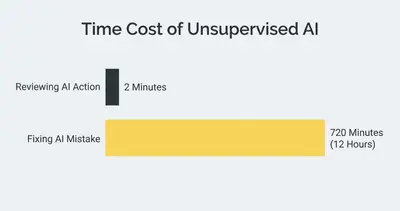
Reviewing an AI-generated database command takes about two minutes. Restoring a corrupted database from a backup takes an average of 12 hours.
Reality Check: Always follow the principle of least privilege. Your AI agents should only have "Read" and "Append" permissions. They should never have the authority to "Update" or "Delete" core data without explicit human intervention.
5. Sending Unreviewed Cold Outreach at Scale
Personalized cold emails work. AI can read a prospect's LinkedIn profile and draft a highly customized email in seconds.
But if you fully automate the sending process, you will eventually look foolish.
AI scraping tools often pull the wrong context. Your AI might see a prospect's post about their dog dying and use it as a "relatable icebreaker" to sell software. It might confuse a prospect's sarcastic post for a genuine business need.
Your automation should draft the emails and save them in a "Drafts" folder. A human rep should spend 15 minutes a day reviewing, tweaking, and hitting send. You still save hours of writing time, but you catch the embarrassing mistakes.
6. Employee Disciplinary Actions and Performance Reviews
Using AI to track employee metrics is fine. Using AI to discipline or fire employees is an ethical and legal nightmare.
AI lacks the context of human life. It sees that an employee missed their quota by 15% and flagged three late arrivals. It does not know that the employee's parent is in the hospital, or that they spent those hours training a new hire.
Relying entirely on algorithms for HR decisions destroys company culture. An employee who cannot see why a decision was made cannot contest it, and a decision no one can contest is not a decision anyone accepts.
Use AI to gather the data and summarize performance metrics. Let human managers have the conversations.
7. Publishing Unfiltered Thought Leadership
The internet is drowning in generic, AI-generated content. You can spot it instantly. It uses words like "delve," "navigate," and "in today's fast-paced digital landscape."
If you set up an automation to write and publish blog posts or LinkedIn updates without human review, you will destroy your brand's unique voice. People do not buy from robots. They buy from experts they trust.
AI agents in 2025 are amazing research assistants. They can outline articles, suggest headlines, and overcome writer's block. But they cannot share your personal experiences. They cannot share the lesson you learned from a client failure last week.
Pro Tip: Use AI to build the skeleton of your content. Then, spend 20 minutes injecting your own anecdotes, strong opinions, and industry data. That 20 minutes is the difference between spam and valuable thought leadership.
The Solution: Build "Human-in-the-Loop" Workflows
You don't have to choose between full automation and manual labor. The middle ground is where the magic happens.
Modern automation tools make human-in-the-loop (HITL) architecture easy. In platforms like n8n or Make.com, you can insert "Wait" or "Approval" nodes into any flow.
Here is how a safe workflow operates:
- Trigger: An event happens (e.g., a new invoice arrives).
- AI Processing: The AI analyzes the data and drafts the action (e.g., extracts $500, prepares payment).
- Human Pause: The workflow stops. It sends a Slack message to the finance manager with "Approve" or "Reject" buttons.
- Execution: If approved, the workflow finishes the task. If rejected, it alerts the team to fix the error.
This setup prevents the most common AI automation mistakes while still saving you 90% of the manual effort.
Wrapping Up
AI is a powerful engine, but it needs a steering wheel. Trusting it to run unsupervised in high-stakes areas is a massive risk to your revenue and reputation.
To safely scale your business with AI:
- Never let AI authorize financial transactions without limits.
- Route angry or complex customer issues to human staff immediately.
- Require human approval for all database modifications and legal documents.
- Use AI to draft outreach and content, but rely on humans to refine and publish.
Stop treating AI like an autonomous employee. Treat it like a brilliant, lightning-fast intern who still needs their work double-checked.
Ready to implement safe, reliable AI automations that actually protect your business? Book a demo with Evalics today. We build robust workflows with built-in guardrails so you can scale without the stress.
By Kevin Michael Schindler, AI Automation Expert at Evalics
Related Resources
- Why Your First AI Automation Will Fail and How to Prevent It
- Understanding AI Hallucinations What They Are and How to Prevent Them
- Why Automating Everything Ruins Customer Experience
- 7 Common AI Automation Mistakes Beginners Make and How to Fix Them
Official Sources
- BBC News: Air Canada Chatbot Misinformation Case
- Harvard Business Review: How to Build Trust in AI
- Gartner: Managing AI Risks and Security